Categories
- All Categories
- Oracle Analytics Learning Hub
- 31 Oracle Analytics Sharing Center
- 20 Oracle Analytics Lounge
- 251 Oracle Analytics News
- 45 Oracle Analytics Videos
- 16.1K Oracle Analytics Forums
- 6.3K Oracle Analytics Idea Labs
- Oracle Analytics User Groups
- 93 Oracle Analytics Trainings
- 16 Oracle Analytics and AI Challenge
- Find Partners
- For Partners
Welcome to the Oracle Analytics Community: Please complete your User Profile and upload your Profile Picture
Fusion to BI Publisher connection
Jestin Rajan
Rank 5 - Community Champion
Hi everyone,
I’m getting this error while using the BI Publisher connector in Fusion:
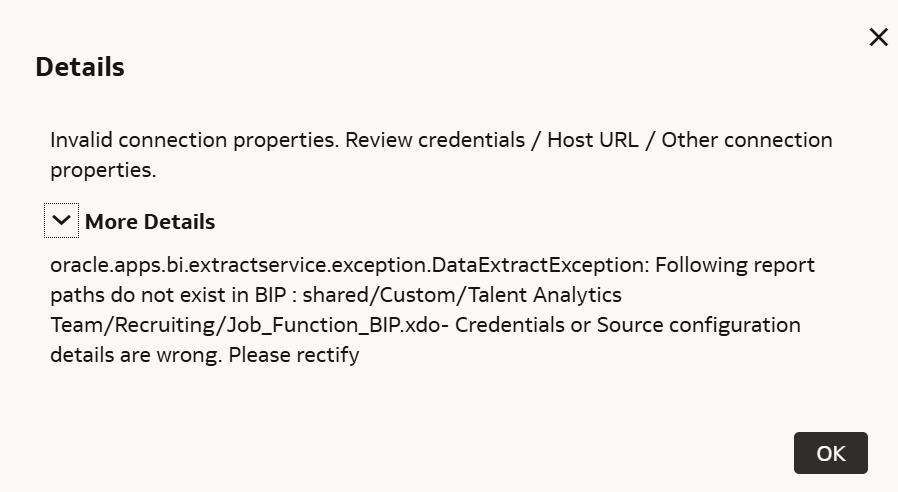
The report definitely exists in that folder, and I can run it manually in BI Publisher.
I’ve already verified:
- The report path and extension (.xdo)
- Correct credentials
- Correct environment (FDI Test)
- Full path entered as
shared/Custom/Talent Analytics Team/Recruiting/Job_Function_BIP.xdo
Still getting the same error.
Has anyone faced this before or can suggest what else to check (permissions, endpoint, etc.)?

0
Best Answer
-
Also, I cannot recall if the path start with share/… or Shared Folders/…. It is worth checking it out.
Hope it helps!
0
Answers
-
Are you able to test BIP Administration → Data Sources→ JDBC Connection?
0 -
Thank you @RVohra, for catching that — I was just copy-pasting the path, and it turns out that removing the “shared/” or “shared folders/” part was the solution.
0 -
I am glad it worked for you.
1


