Oracle Transactional Business Intelligence

Welcome to the Oracle Analytics Community: Please complete your User Profile and upload your Profile Picture

How do I show 1 row per employee based on ranked address type

Accepted answer
62
Views
8
Comments

Some employees have multiple address types on file. I am trying to show 1 row per employee based on address type. I want it show home address (address rank 1) but if none exist then show Mailing Address (Address rank 2). I created a case statement to assign address rank.

thanks

image.png

Best Answer

  • Riti Malhotra
    Riti Malhotra Rank 3 - Community Apprentice
    Answer ✓

    Solution: I used the RANK function to assign each address type a value of 1, 2, or 3. If a home address wasn’t available, the system automatically assigned the mailing address a rank of 1. Then I used the FILTER function to return only the entries with a rank of 1.

Answers

  • gclampitt
    gclampitt Rank 6 - Analytics & AI Lead

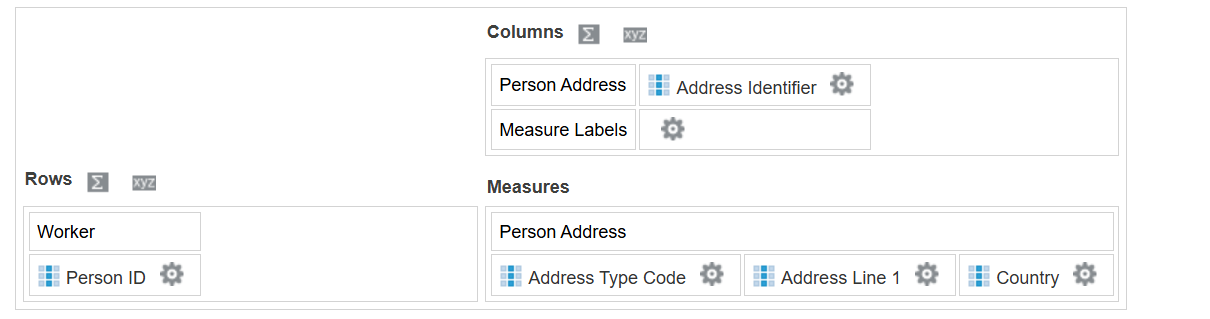
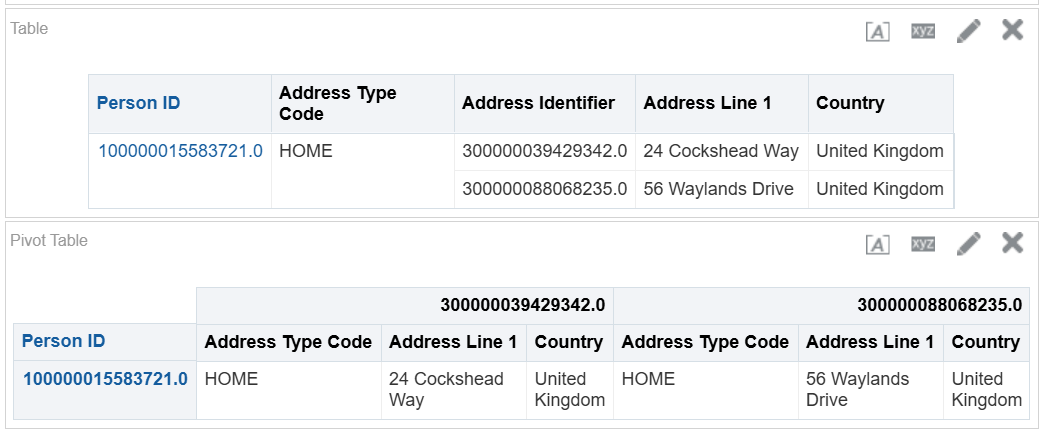
    Use a pivot table - put say the unique address identifier as a column then the rest of the address details as a measure and set the aggregation to max.

    image.png


    image.png

    Can then hide the address identifier if need too.

  • Riti Malhotra
    Riti Malhotra Rank 3 - Community Apprentice

    thanks but I need it show only only 1 address even if two exist.

  • gclampitt
    gclampitt Rank 6 - Analytics & AI Lead
    edited Nov 24, 2025 10:30AM

    what are the rules for that then? which address do you want to see? any?
    eg if want the latest record - then create report B which returns the address with the max date, then report A returns the address for this date by referencing report B.
    or can use the RANK function to return the one you want.
    There will be plenty of similar examples on this forum if you search for them.

  • Riti Malhotra
    Riti Malhotra Rank 3 - Community Apprentice

    I didn't find anything which is why I posted.. I am looking to only show Home address but it it doesn't exist then show Mailing address

  • gclampitt
    gclampitt Rank 6 - Analytics & AI Lead

    Within your report. Use union and subquery (query based upon results of another analysis)

    Home address Query : filter Address type = Home
    Union
    Work address Query : filter Address type = Mailing
    and Emp not in (Subquery where Address type = Home)

    So 1st part returns everyone with Home Address and 2nd part people with Mailing address, who dont have a Home address

  • Riti Malhotra
    Riti Malhotra Rank 3 - Community Apprentice

    thanks I was able to rank them and then filter. appreciate your response.

  • RVohra
    RVohra Rank 7 - Analytics & AI Coach

    Good to see your issue got resolved, appreciate if you can outline the steps or screenshot explaining the solution. It will help the community in case there is someone who might have same requirement.