Categories
- All Categories
- Oracle Analytics Learning Hub
- 30 Oracle Analytics Sharing Center
- 20 Oracle Analytics Lounge
- 241 Oracle Analytics News
- 45 Oracle Analytics Videos
- 16K Oracle Analytics Forums
- 6.3K Oracle Analytics Idea Labs
- Oracle Analytics User Groups
- 89 Oracle Analytics Trainings
- 16 Oracle Analytics and AI Challenge
- Find Partners
- For Partners
OAS 2025 – Excel export adding extra blank rows for columns with HTML
Hi all,
We’re migrating from OBIEE 12.2.1.4 to OAS 2025 and noticed a difference in how classic reports export to Excel.
For one of our classic report columns, we’re using the following Column Data Format:
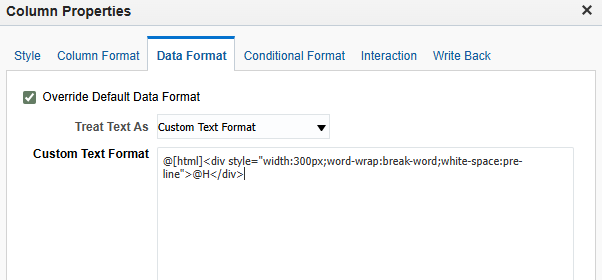
This is used to wrap long text and preserve line breaks.
Behavior difference:
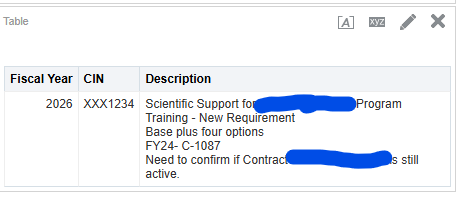
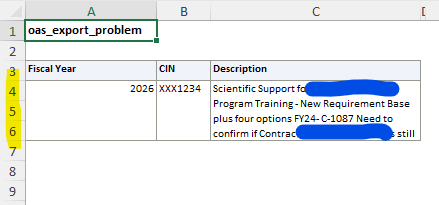
- In OAS 2025, when we export this report to Excel, any value that contains line breaks (HTML newlines rendered via
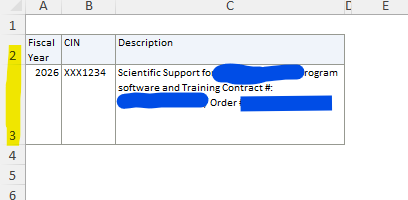
white-space: pre-line) results in multiple Excel rows, even though the extra rows have no data. - In OBIEE 12.2.1.4, the same column format exported to a single Excel row, with the line breaks preserved inside one cell, and no extra blank rows.
OAS report output:
OAS excel output:
OBIEE Excel Output:
Is this a known / expected change in how OAS 2025 handles HTML-formatted columns when exporting to Excel? And is there a setting to keep the 12c format output?
Thank you for checking.
Best Answer
-
Hi @Sherry J George
You always provide the BEST details, thanks for that!!
See:
MOS
After Upgrading to OAS, the Exported Excel File Has Extra Blank Rows (Doc ID 2887748.1)
After this weekend, new CMOS
After Upgrading to OAS, the Exported Excel File Has Extra Blank Rows KB5886310
Answers
-
Perfect, that worked! I had actually come across that document earlier but didn’t realize it was related, and other tasks took priority so I hadn’t tried it. Thank you very much for pointing me back to it!
0


