Categories
- All Categories
- Oracle Analytics Learning Hub
- 32 Oracle Analytics Sharing Center
- 22 Oracle Analytics Lounge
- 254 Oracle Analytics News
- 45 Oracle Analytics Videos
- 16.1K Oracle Analytics Forums
- 6.3K Oracle Analytics Idea Labs
- Oracle Analytics User Groups
- 94 Oracle Analytics Trainings
- 16 Oracle Analytics and AI Challenge
- Find Partners
- For Partners
BIP report's header to be that column's Property > Label when output format is .csv
Hi Experts,
I would like to reach out to you for my question below:
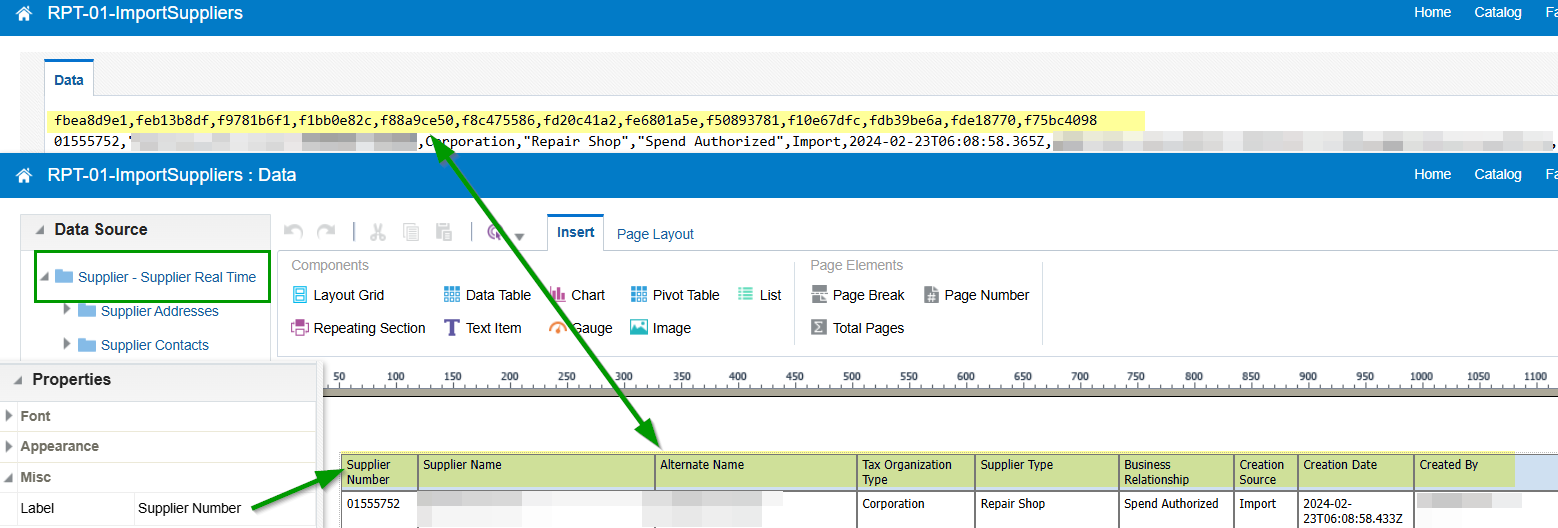
The BIP report is having Subject Area (Supplier - Supplier Real Time) as the data source.
And I am simply using a Data Table to extract the supplier data.
When the output is Excel file, the columns' header are presenting correctly, aligned with what I see in design (edit mode).
However, when the output format is .csv, the headers are raw data's headers, like "fbea8d9e1", "feb13b8df",…etc.
May I ask how to change it, assuming I have to use .csv as the output format?
We are trying go let OIC integration to run this report (invoke the runReport operation and capture the output in Stage File action), so the output seems need to be in .csv for Stage File's handling.
Please kindly advise, thank you very much.
Liwen
Best Answers
-
If you are using the default csv output, this is the expected behavior.
Please check the below thread for suggestions and workaround:
Output CSV format for a BI Publisher file as per template — Oracle
Thanks.
1 -
Hi
Please refer to the given help center about CSV output
https://docs.oracle.com/en/cloud/saas/otbi/otbi-pub-design/generate-csv-output.html
Reports in CSV format are directly generated from the data models. The CSV output contains carriage return and line feed characters at the end of each line. Template output will be ignored while using CSV as output format. This is expected behaviour.
1
Answers
-
Hi @MandeepGupta and @Rajasekhar Bandaru-Oracle,
Thanks much on the prompt reply. Noted that csv output is expected to have the raw data presented.
Will adjust it in downstream applications as workaround. Thank you both!
Liwen
1 -
Thank you for the response.
Please mark the post as Accepted Answer.
0

