Categories
- All Categories
- Oracle Analytics and AI Learning Hub
- 40 Oracle Analytics and AI Sharing Center
- 20 Oracle Analytics and AI Lounge
- 277 Oracle Analytics and AI News
- 50 Oracle Analytics and AI Videos
- 16.2K Oracle Analytics and AI Forums
- 6.4K Oracle Analytics and AI Idea Labs
- Oracle Analytics and AI User Groups
- 103 Oracle Analytics and AI Trainings
- 18 Oracle Analytics and AI Challenge
- Find Partners
- For Partners
Fusion AI Data Platform – Derived Data Lineage Workbook for Fusion HCM Analytics

Oracle Fusion Analytics (Fusion Analytics), a part of the Oracle Fusion AI Data Platform, is a family of prebuilt, cloud-native analytics applications for Oracle Fusion Cloud Applications that provide ready-to-use insights to help improve decision-making. It’s extensible and customizable, allowing customers to ingest data and expand the base semantic model with additional content.
In addition to the pre-built content FAIDP offers in each pillar, we have an ongoing effort to provide more reusable artifacts for FAIDP which is described in this blog.
In this post we are sharing a reusable workbook that draws relationships various objects with FAIDP and OTBI. Thus providing the luxury of having all the data lineage in once place.
Note, FAIDP does not provide the data lineage to map columns to PVOs directly. However, using the publicly available separate data lineage (both FAIDP and OTBI) information, we have come up with a hands on solution to provide single-pane window to view both data lineage information. Using this, we can draw relationships and understand model and mapping to certain extent, and also helps understand the data model better and to plan the Semantic Model Extension by examining the data lineage.
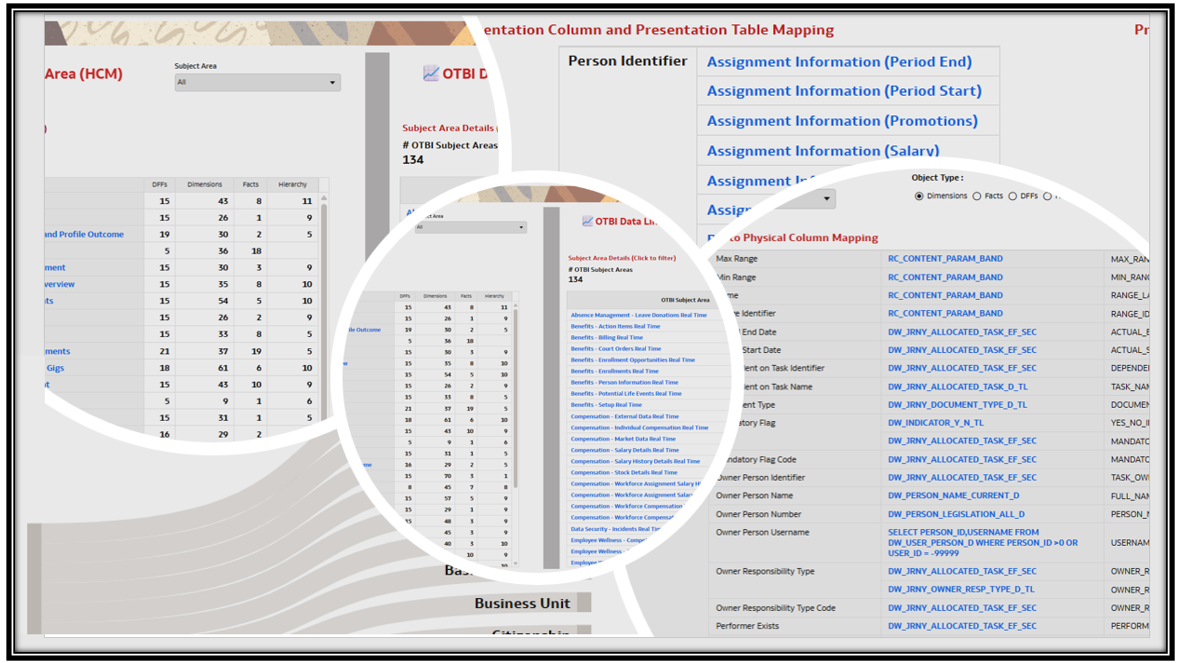
NOTE: If you experience any issues importing this workbook or running it, it may be likely that your environment is on a version of FAIDP and/or OAC that is lower than the version used for developing this workbook. Update/upgrade timings are dependent on the data center your instance is in. We recommend waiting until your instance is upgraded to the latest version before importing and using this workbook.
Functional Areas
Not Applicable
Subject Areas
Not Applicable
Business Use Case
The provides single pane of window to view or compare both FAIDP and OTBI data lineage each products share separately. This helps in understanding the underlying data model / metadata and also look for the needed targets for Semantic Model Extension and Data Augmentation use cases.
Pre-Requisites:
None
The dva you are using may be an older version – you can replace the latest version data lineage files if needed to get the latest data lineage information.
Attachments
General Guidelines and Best PracticesHere some guidelines and recommendations to adapt these workbooks to your environment. Additionally, review the information provided on the workbook Help page (if any) to ensure the workbook renders data after you select the appropriate options and filters.
- Download the workbook from the above attachment section and import the workbooks to your instance. Note: These workbooks don’t have passwords, in general. Password, if any will be explicitly called out.
- All the workbooks will have a Help page containing required information and guidance on how to use the workbook. Be sure to follow these instructions before using the workbooks on your instance.
- Note, workbooks cover only generic use case / business scenario. Review the workbook content, make any changes as needed, and set the appropriate filters.
- It is highly recommended that you perform basic sanity checks and data validity before rolling out workbooks to business users and analysts.
Comments
-
Hello Community Members, here is the FAIDP Data Lineage workbook and we plan to share it for other pillars too. In the meanwhile would be great to get feedback from the community on usability of this workbook
1 -
It looks very useful and well-organized. Shall review it further and share feedback. Looking forward to similar workbooks for the other pillars.
Thanks for sharing @Anitha Ramarao-Oracle!
1 -
Thank you @Bhaskar Konar
0 -
Thanks @Anitha Ramarao-Oracle much appreciate your thought and effort. One quick question is there anyway where we can get a easy way to extract data from our existing environments and build dataset and then link to the given workbook. Hope i'm clear?
0 -
This covers only out-of-the-box. I don't know any way where you can extract the data from your FDI instance assuming you are asking for SME / external RPD objects . At the most you can use content explorer or the publicly available data lineage files and use as datasets - similar to what is done here. Any other data model info you have for external RPD / SME which you might have managed - you could still add them to the data files used here and upload back to use - just by ensuing the column / data are matching to current data. Hope I answered your question.
1 -
@Anitha thank you! , One more idea can we build AI agent which extract similar data when i install or run that agent on my existing environment and build a workbook like this helps a lot.. Keep this for AI future development
0 -
Excellent idea… Would you please post this on idea lab? It would be good to see this in the product.
1 -
Sure. thank you!
0

