Does anyone know if there's a way to refresh a Repository variable on demand? There is an option to define the refresh frequency, but I couldn't find a way to refresh it manually.
Hello,
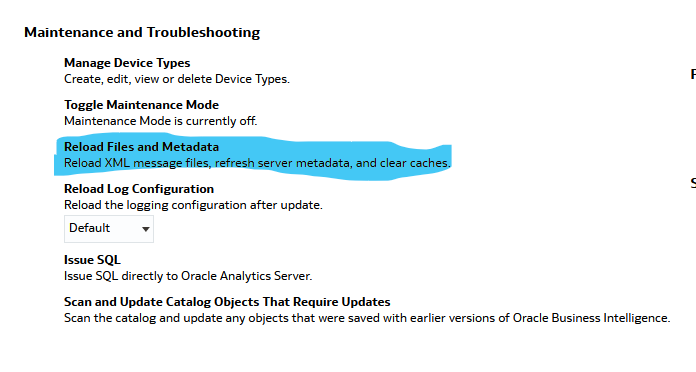
In Oracle Analytics Cloud (OAC), the "Reload Files and Metadata" action is the standard administrative operation used to refresh the RPD (repository) in online mode and applies any changes, including updates to repository variables.
https://docs.oracle.com/en/cloud/paas/analytics-cloud/acabi/classic-administration-page.html
@DeepaliG-Oracle , I do not think we can refresh it manually.
If it is a static repository variable, it's value is initialized in the Variable dialog.
The value of the static repository variable persists and doesn't change until an administrator decides to change it. For example, suppose you want to create an expression to group times of day into different day segments. If Prime Time were one of those segments and corresponded to the hours between 5:00 PM and 10:00 PM, you could create a CASE statement like the following:
CASE
CASE WHEN "Hour" >= 17 AND "Hour" < 23 THEN 'Prime Time' WHEN... ELSE...END
If it is a dynamic repository variable, it can be initialized in the same way as static variables, but the values are refreshed by data returned from queries.
When defining a dynamic repository variable, you create an initialization block or use a preexisting one that contains a SQL query. You also set up a schedule that the Oracle BI Server uses to run the query and periodically refresh the value of the variable. When the value of a dynamic repository variable changes, all cache entries associated with a business model that reference the value of that variable are purged automatically.
Each query can refresh several variables, one variable for each column in the query. In Oracle BI Server, create a schedule to run the queries.
Please refer this doc for more details. Hope it helps!
Thanks @Henry Cabrera @SteveF-Oracle @RVohra, for your answers. Let me review and analyze what fits for our use case.
@DeepaliG-Oracle feel free to share your analysis here. It will help community in long run. Thanks
There is no native “Refresh Now” button for Repository Variables in Oracle Analytics.
Repository variables (especially dynamic ones) are refreshed only through:
They are evaluated and stored at the BI Server level, not at the dashboard/runtime layer. So dashboards, prompts, and analyses have zero control over forcing a refresh.
Use these options given below
If you truly need on-demand refresh logic, session variables are much more flexible.
Why?
This is usually the recommended design if the value must reflect near real-time logic.
In the init block settings, you can:
But downside:
If my response has answered your question, please mention the thread as Accepted Answer as this will help the community members on the solution
Description: The Oracle Fusion Data Intelligence (FDI) Product Roadmap Update provides an overview of the latest developments and future plans for FDI. Oracle Product Management experts will share upcoming capabilities, key enhancements, and product direction, helping attendees understand what is changing and how these…
I'm trying to index a Local Subject Area so I can use it in my AI Agent, however, I keep receiving the generic error below. Request status(500) : error = {"prefix":"DSS","code":50000,"message":"There was an unexpected error while processing this request. Please try again."}
it is observed that in OAC while using case statements the output is not expected.For example if we have a case statment like case when table1.column1=table2.column1 then 'yes' else 'No' end as Attribute1 Now if i use this attribute with a fact-amount column attribute 1|| Amount on a report then we dont get the aggregation…
Once I select that value from the list box Region I created, I want to filter the table by my selection. See the images
Hi, While using OAS or OAC latest version can we generate a report to view complete defition of semantic model/subject area. It helps to document and troubleshoot. thanks