Categories
- All Categories
- Oracle Analytics and AI Learning Hub
- 43 Oracle Analytics and AI Sharing Center
- 19 Oracle Analytics and AI Lounge
- 282 Oracle Analytics and AI News
- 59 Oracle Analytics and AI Videos
- 16.3K Oracle Analytics and AI Forums
- 6.4K Oracle Analytics and AI Labs
- Oracle Analytics and AI User Groups
- 108 Oracle Analytics and AI Trainings
- 20 Oracle Analytics and AI Challenge
- Find Partners
- For Partners
Access Control Issue: DV Datasets Visible in Classic Analytics
We have observed that, by default, Data Visualization (DV) datasets appear in the “Create Analysis” list under Classic Analytics in OAC, regardless of specific user or role permissions.
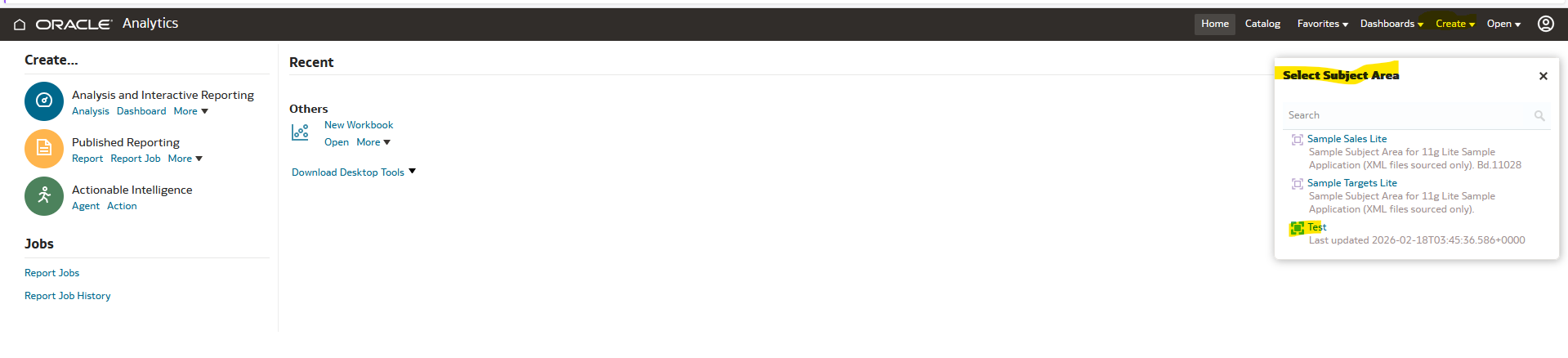
The background of this issue is that the user currently holds the BI Author role. With this role, users are able to create Classic Analytics reports using Subject Areas within the OBIEE 12c / OAS environment.
At present, we have two functional reporting areas designed in BI:
- Finance
- HR
We have shared an HR Data Visualization (DV) report with the user under read-only access (DV Consumer role). However, since the user also holds the BI Author role, they are able to create Classic Analytics reports using datasets that they can access.
For example:
- Finance DV Reports Role: DV Consumer – User can only view DV reports.
- HR Adhoc Reports Role: BI Author – User can create Classic Analytics reports.
Kindly review and advise on the appropriate solution
Answers
-
Hi Jayaraman,
In OAC/OAS, Data Visualization (DV) datasets are exposed as logical data sources once a user has:
- Access to the dataset (even read-only)
- AND authoring privileges (like BI Author)
So when a user has the BI Author role, the platform assumes:
“If you can author analyses, you can use any accessible data source — including DV datasets.”
That’s why:
- DV datasets show up in Create Analysis
- Even if the user only has DV Consumer on the DV report
- Because dataset access ≠ report access
Sharing a DV project as read-only does not isolate the underlying dataset.
0 -
Your Current Role Design (Root Cause)
From your setup:
Area
Role
Result
Finance DV
DV Consumer
View only (correct)
HR Adhoc
BI Author
Can create Classic reports
DV Dataset (HR)
Accessible
Appears in Create Analysis
The key conflict:
BI Author + Dataset visibility = Dataset usable in Classic Analytics
Restrict Dataset Permissions (Most Direct Fix)
Instead of only sharing the DV report:
- Go to: DV Dataset → Permissions
- Remove access for the BI Author users/groups
- Only grant access to intended DV Consumers
This ensures:
- Dataset will NOT appear in Create Analysis
- Even if user has BI Author role
👉 This is the cleanest and Oracle-recommended approach.
0 -
If my response has answered your question, please mention the thread as Accepted Answer as this will help the community members on the solution
0

