Categories
- All Categories
- Oracle Analytics and AI Learning Hub
- 48 Oracle Analytics and AI Sharing Center
- 19 Oracle Analytics and AI Lounge
- 286 Oracle Analytics and AI News
- 57 Oracle Analytics and AI Videos
- 16.3K Oracle Analytics and AI Forums
- 6.4K Oracle Analytics and AI Labs
- Oracle Analytics and AI User Groups
- 110 Oracle Analytics and AI Trainings
- 20 Oracle Analytics and AI Challenge
- Find Partners
- For Partners
OTBI Dashboard : How to enable Export to Excel for seeded L1 reports?
We built a new OTBI dashboard by copying a seeded OTBI dashboard and added an L0 KPI graph.
Business requirement: when a user clicks the L0 KPI and navigates (drills) to the L1 report, they need to export the L1 data to Excel for further analysis.
Issue: the Export option is not available on the seeded L1 report page.
Has anyone enabled Export to Excel for seeded L1 reports before? If so, what settings or security permissions are required (e.g., OTBI/BI privileges, analysis/dashboard properties, or profile options) to make the Export option visible at L1?

Answers
-
Hi @AnuragGandhi,
Welcome the Oracle Analytics & AI Community!
If you want to enable download from the Dashboard page, please find below steps (especially highlighted in yellow).
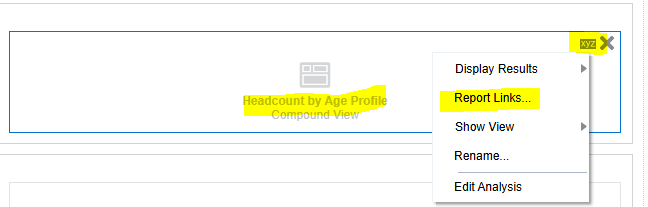
Edit the Dashboard Page and go the report where the export needed to be enabled.
Click on 'Report Links'
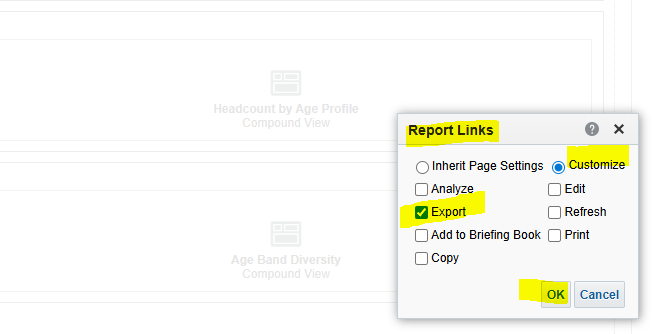
After selecting the 'Export' press 'OK' and Save the page. Now test if the 'Export' option appearing in the Dashboard or not.
Hope this help.
Thank you.
0