Hello NetSuite Community,
Here is a quick refresher on Time-Off Management using SuitePeople HR.
As some of you may have experienced, keeping track of all the time-off notifications, requests and approvals from direct reports can be time consuming and challenging.
Remembering time-off dates filed in advance, analyzing whether there are any conflicting time-off schedules, and if there is team coverage during peak periods are just some of the concerns that managers must deal with when overseeing their team’s time-off.
The Time-off Summary page helps with addressing these challenges.
The Time-off Summary page is a tool for managing time-off requests in Employee Center and can be accessed through the Time-off Portlet and Home Links.
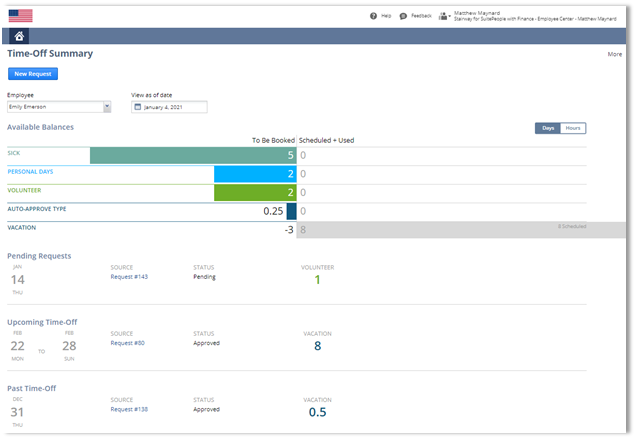
Using the Time-Off Summary page managers can view their own time-off balances and filed requests, as well as the time-off information for their direct reports.
Managers can switch between different employees to see available and booked balances for each time-off type, providing a better view of team time-off utilization during approvals.
This page also summarizes pending, upcoming, and past time-off requests filed by direct reports, making it easier for managers to review time-off requests booked in advance and organize schedules during peak time.
To learn more about this feature, visit View Time-off Summary (Answer Id: 71720) in SuiteAnswers.
We would love to hear from you! If you have any questions or ideas on SuitePeople’s Time-off Management feature, feel free to drop a comment below or start a new discussion in the SuitePeople HR group.
Cheers!
Julia Ong (Product Manager, SuitePeople HR)
