Discussions
Stay up-to-date with the latest news from NetSuite. You’ll be in the know about how to connect with peers and take your business to new heights at our virtual, in-person, on demand events, and much more.
Now is the time to ask your NetSuite-savvy friends and colleagues to join the NetSuite Support Community! Refer now! Click here to watch and learn more!
Update your Profile with your Support type to get your Support Type badge.
Nominate Your Peers for NetSuite Support Community's Choice of the Quarter! Submit your nomination today.
No Limits. Just possibilities.
Join us for complimentary one-day events around the world and step into a future fueled by AI and limitless potential. Explore new breakthroughs, sharpen your skills, and connect with experts who are shaping what’s next. Experience bold keynotes, interactive learning, and connections that span the global NetSuite community. Discover what's next at SuiteConnect Tour 2026.
Try Intelligent Payment Automation – Fee Free For Your First Month
Intelligent Payment Automation, powered by BILL (aka Bill.com), lets you automate payments, manage vendor details, and bank account information within NetSuite.
The SuiteApp is available to organizations based in the U.S. with a valid U.S. address, or to global customers (except Canada, China, and Japan) with U.S. business subsidiaries. It only supports payments to vendors operating in the United States.
For more information, visit this thread.
Intelligent Payment Automation, powered by BILL (aka Bill.com), lets you automate payments, manage vendor details, and bank account information within NetSuite.
The SuiteApp is available to organizations based in the U.S. with a valid U.S. address, or to global customers (except Canada, China, and Japan) with U.S. business subsidiaries. It only supports payments to vendors operating in the United States.
For more information, visit this thread.
Community Articles: What Topic Should We Cover Next? Your idea could be our next feature—drop your suggestion now and spark the next big discussion!
NetSuite Admin Tips | How to access all Content Types for Site Management Tools
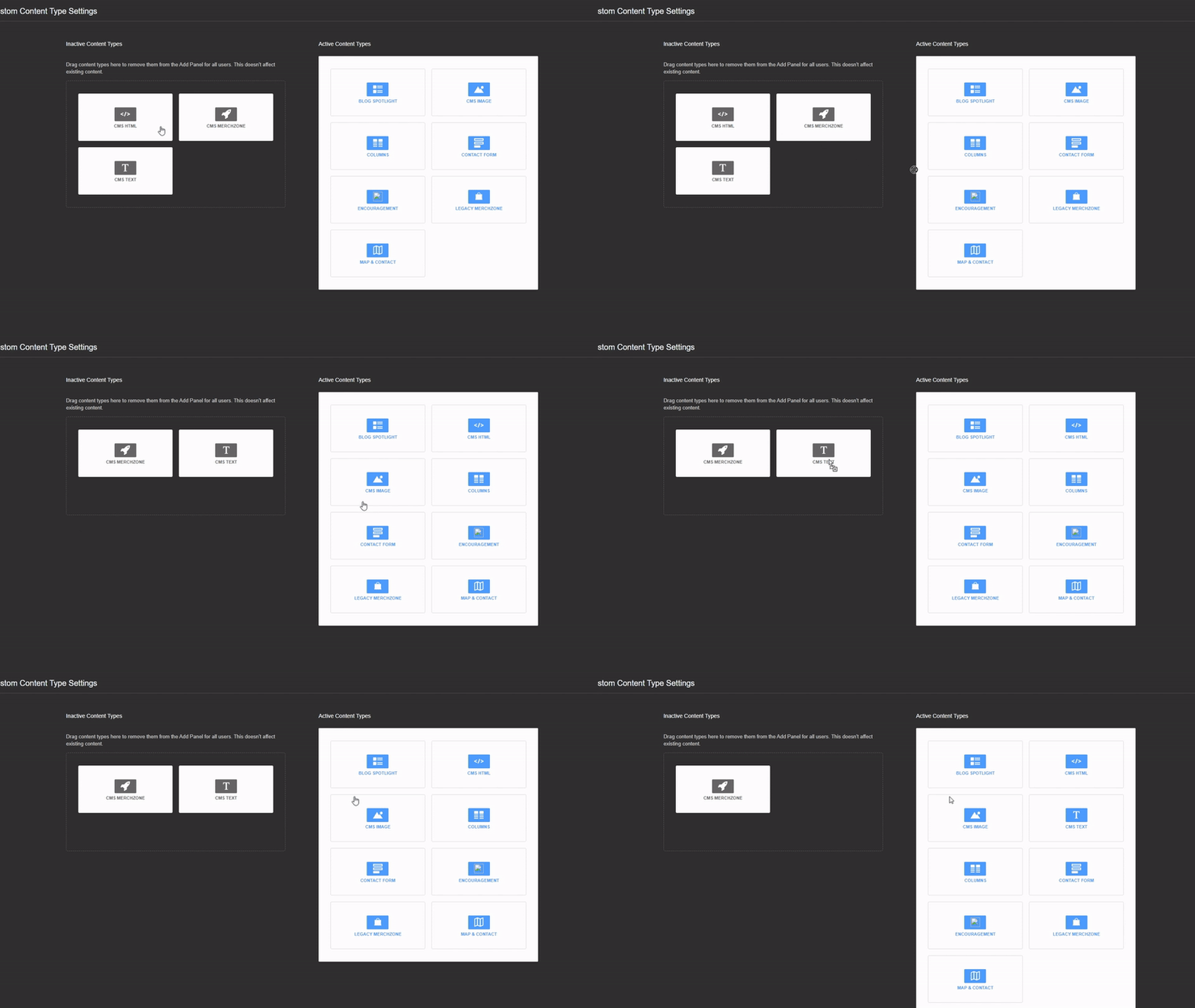
When creating customizations using Site Management Tools, you may have noticed that some Content Types are missing when trying to add Content using Edit Mode. To ensure that you have access to all available content types follow the steps below:
1. Access your domain
2. Tap the "ESC" button to access Site Management Tools
3. Login to Site Management Tools
4. On the Site Management Tool Page, navigate to the upper right corner and click the Settings icon.
5. Drag and Drop the desired Content Types from the Inactive Content Types Column to the Active Content Types Column
6. Click on the Pencil Icon to go back to Edit Mode
Tagged:
1