
A Bill of Materials (BOM) is a crucial element in manufacturing, representing the list of components and resources required to assemble a product. Generating reports or Saved Searches to show the cost breakdown of Assembly Items, including bills of materials, operations, and cost types based on selected bill of materials revision is a very common requirement in manufacturing industries.
The standard NetSuite account provides the ability to show the Costed BOM though the Costed BOM Inquiry report (Transactions > Manufacturing > Costed Bill of Materials Inquiry). Alternatively, a Saved Search can be used, but note that it comes with limitations, as it cannot display the complete structure of an Assembly Item down to the final level of its component items. To address this limitation and to provide an enhanced functionality, focusing specifically on improving Bill of Materials (BOM) management and cost-related features, a new SuiteApp named Costed BOM SuiteApp is made available.
The Costed BOM SuiteApp provides additional capabilities for more detailed cost tracking. It can be especially valuable for organizations with complex manufacturing processes and specific requirements.
To those who are planning to explore this new SuiteApp, it is important to note the following:
· Administrator Role: Only users with the Administrator role can install the Costed Bill of Materials.
· NetSuite OneWorld: The SuiteApp requires a NetSuite OneWorld account.
· Supported Browsers: Check SuiteAnswers ID 108950 to see which browsers are compatible with the Costed Bill of Materials.
For your guide on installing a SuiteApp, visit the following articles:
· SuiteAnswers ID 89807 - Installing from the SuiteApp Marketplace
· SuiteAnswers ID 82326 - SuiteApp Marketplace in NetSuite
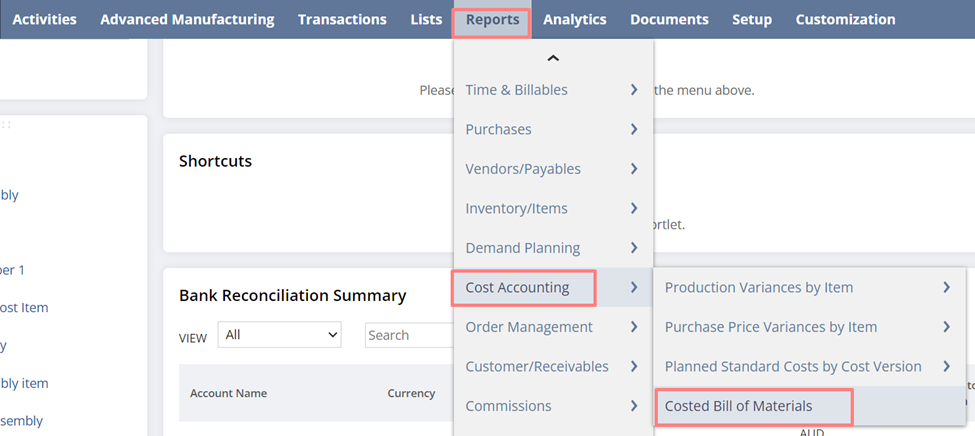
Once the SuiteApp is successfully installed, you can access the Costed Bill of Materials through Reports > Cost Accounting > Costed Bill of Materials.
Populate all the required fields and click on Submit.
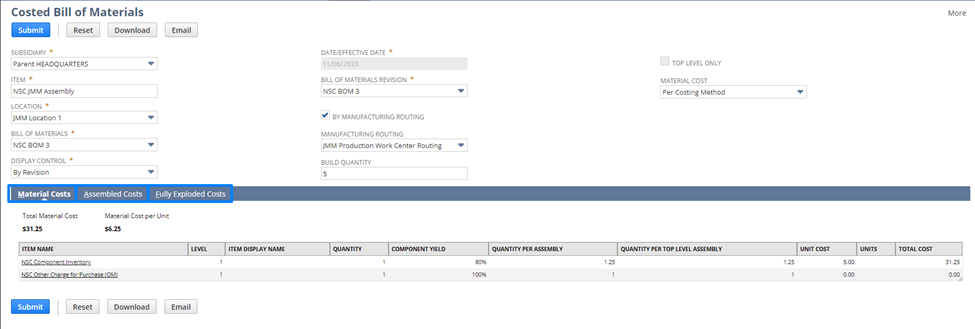
You can now view the details of the Material Costs, as well as the Assembled Costs and Fully Exploded Costs when the “By Manufacturing Routing” checkbox is marked.
Before implementing the SuiteApp, ensure that you are well-acquainted with its features and functionalities. To know more information on how the SuiteApp can help you, check SuiteAnwers ID 108914.
Has anyone tried using the SuiteApp already? Feel free to share your experience or provide tips to our fellow members who are planning to explore it. Your insights can be incredibly valuable!
