Hello
We have experienced some unexpected currency symbols on tiles for some users. We have thus dug deeper and found the following:
For most users it shows like this

For one user it showed like this

What is shown depends on combination of
- Currency field setting on the analysis
- the NSAW user’s profile setting and
- the Browser’s language setting
Currency field setting - in the analysis itself - select AUD/AU$
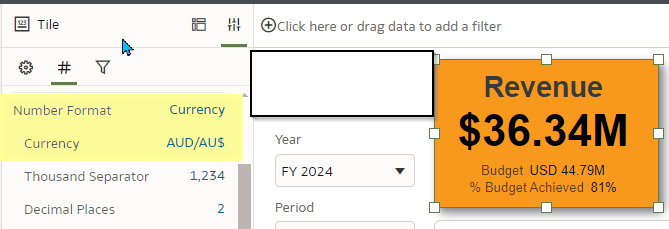
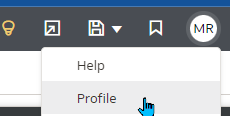
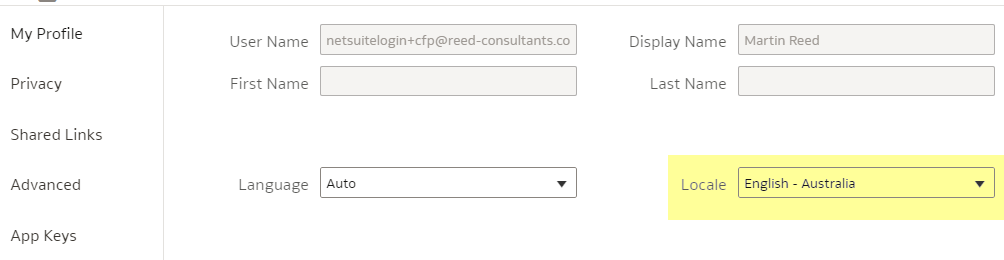
On users profile (top right corner with acronym and select Profile)- Update profile to English-Australia
Chrome’s language can be set between English US and English Australia, with the top one being the one that applies. Firefox does not have this option

Best setting we found for any non US customers are thus
- Set Currency Tiles to the specific non USD currency e.g. AUD/AU$
- Get users to set their NSAW profile to the specific country e.g. English-Australia
This way a user's browser language setting would not impact and it would work on both Chrome and Firefox
Question to the wider community
Is there a way to default the currency format to any other currency than USD in NSAW ?
It defaults to USD

Is there a way to default the User Profile to any other e.g. English-Australia?
It defaults to 'Auto' . This only gives the correct currency in Chrome if the Chrome default language is set to Australian English. It does not work correctly in Firefox
