Organization Name (Required - If you are an Oracle Partner, please provide the organization you are logging the idea on behalf of):
GSO
Description :
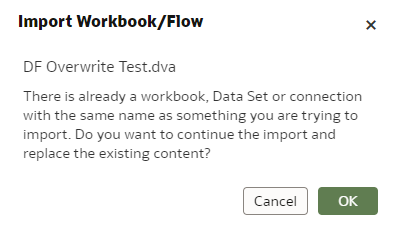
We require improvements in the overall prompts received by a user when importing a .DVA file and files with the same name are detected during the import process.
Use Case and Business Need :
This is required as BI Developers need to be made fully aware of the full scope of impact when Overwriting objects / artifacts during an import process. The current notification / prompt does not assist the user in fully determining impact of action and we have several complaints / requests in this area.
More Details
Currently when a user imports a .DVA file he/she is shown the following prompt with no identifying information of the impacted artifacts / objects.
This is problematic specifically for .DVA files containing a workbook / dataflow AND the underlying datasets used in said workbook / dataflow. The user should know that overriding this prompt message will also have impact on the datasets in the new location as they will be overwriten as well. We already have a sample of this kind of functionality working in the case of applying permission changes.
A similar feature would be required for .DVA import showing a clear list of all impacted artifcats / objects to be overwritten by the import action.