Summary:
Fusion analytics Warehouse now offers a new subject area on payroll balances.
Content (required):
Payroll as of now is in Generally Available. So customer need to enable it from Enable Feature UI - Generally Available. To start using payroll subject area ,there is a Balance Group in Cloud HCM - Analytics Balance Group - which needs to be setup. FAW pipeline will only fetch data based on setup present at balance group in cloud HCM. Sample setup is shared with this post.
The sample that we have given here is based on technical formula that we have referred in subject area measures. As you mentioned if any base dimension we have mentioned in the sample file is not relevant for you , you may please choose appropriate values in balance group setup. After pipeline run , you can go to payroll config UI in FAW and update base dimension against the required measure. So that subject area starts showing values as per base category and base dimension selected in Cloud HCM and eventually in FAW Payroll Metric config UI.
Also , as I mentioned that the file we have shared on this customer connect post is based on technical formula referred in subject area. When you will go to balance group UI , you will not find the exact base dimension name. For example , Core Relationship Tax Unit Run will be visible as Relationship Tax Unit Run. I have attached technical base dimension name and corresponding value that you can see in balance group UI in "Balance Group Setup Details.xlsx" excel file. This combination is for US legislation. If there are additional legislation that customer wants to setup then to retrieve combination of base dimension name and corresponding UI value. Please import attached Cloud HCM BI catalog files in your cloud HCM instance , unzip "Payroll Balance Group Setup details.Zip" file - Use unarchive option and run the reports. I have also attached sample output files of these reports.
Also , in certain legislation the base category name also may differ. For example , In technical formula , we refer Earning as base category but on Balance group UI - for US you will see Standard Earning whereas for UK you will see Regular Earning. For this mapping please refer - "Balance Category Details Report.xlsx". BI catalog file attached also has a separate report for base category that also can be run and use results of that report as well.
NOTE : Every combination of base category and base dimension is not suppose to be setup in balance group. Only the one that you want to report on needs to be setup. Refer Balance group details.xlsx file for OOTB formula.
Balance Group Setup Details.xlsx
Payroll Balance Group Setup Details.zip
Base Dimension Report_Base Dimension Report.xlsx
Balance Category details report_Balance Category details report.xlsx
Payroll Balances Overview (2).zip
Key highlight of the subject area :
- Support for time dimension - this enables customers to report across pay periods & across time dimensions as well
- OOTB support for Period to Date measures like Year To Date , Quarter To date & Month To date
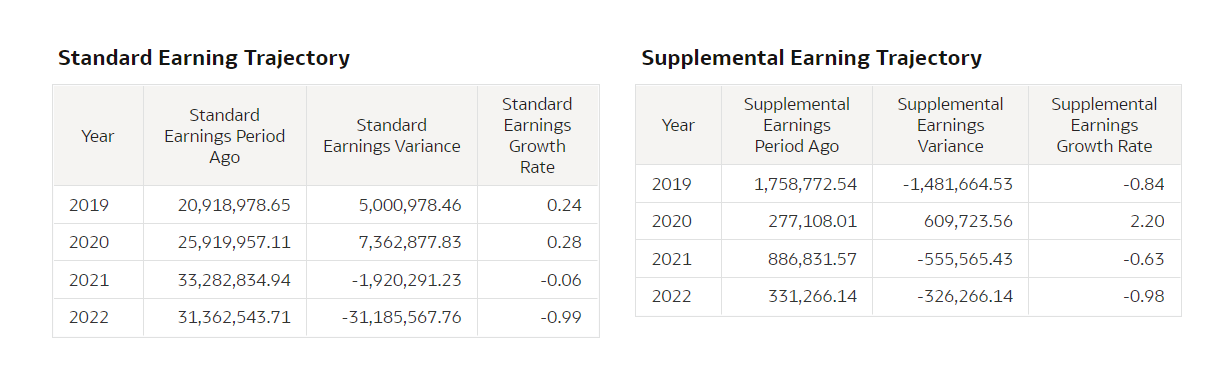
- OOTB support for variance and growth rate measure to spot anomalies if any and plot trends easily
- Ability to do accurate retrospective reconciliations - details of which have been mentioned in the blog mentioned below.
FAW platform also support a payroll metric configuration UI , which can be utilized mainly for Non- US legislation based balances. For example if an organization has operations in US & Canada both then OOTB derived measures by default will only show US values, if you want to include Canada was well in OOTB derived measure then you need to set it up using the payroll config UI. The same UI can also be used to change OOTB measure formula for payroll.
For all details please refer our blog -https://blogs.oracle.com/analytics/post/announcing-payroll-analytics-in-oracle-fusion-hcm-analytics
Version (include the version you are using, if applicable):
21.R3.P2
Code Snippet (add any code snippets that support your topic, if applicable):