Categories
- All Categories
- Oracle Analytics and AI Learning Hub
- 54 Oracle Analytics and AI Sharing Center
- 26 Oracle Analytics and AI Lounge
- 311 Oracle Analytics and AI News
- 57 Oracle Analytics and AI Videos
- 16.4K Oracle Analytics and AI Forums
- 6.7K Oracle Analytics and AI Labs
- Oracle Analytics and AI User Groups
- 117 Oracle Analytics and AI Trainings
- 24 Oracle Analytics and AI Challenge
- Find Partners
- For Partners
Setup a customized Step index for Gauge Dial using OTBI or BIP

Description
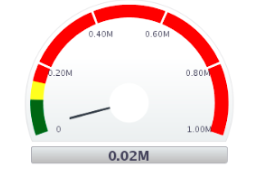
For the Gauge Dial, we can specify Threshold values. But we cannot set the "Step Index", by default it takes 5 or 6 Step Index for Gauge.
Use Case and Business Need
The scenario is to identify the performance of Person using Gauge:
Threshold 1: 0 to 100,000
Threshold 2: 100,00 to 150,000
Threshold 3: 150,000 to 1,000,000
By using above data, we can set a Threshold to the Gauge but we may not able to setup the Step Index using OTBI or BIP. Please look into attached Graph image for more detail. If we look into the graph, you can see 3 Threshold Colors and 6 Step Index(including min and max), since we need only 3 Step Index. Index representation is default (Trillion, Billion, Million, Thousands). It is very difficult to identify where Green Threshold value ends or Yellow Threshold value ends. It doesn't make sense, even if Step Index are represented at different positions. If there is an option to control Step Index values, so it improves the Graph Visibility.
Original Idea Number: 19cc5dd18c