Summary
How to convert text fields into dates with data that has null or "-" or ""
Content
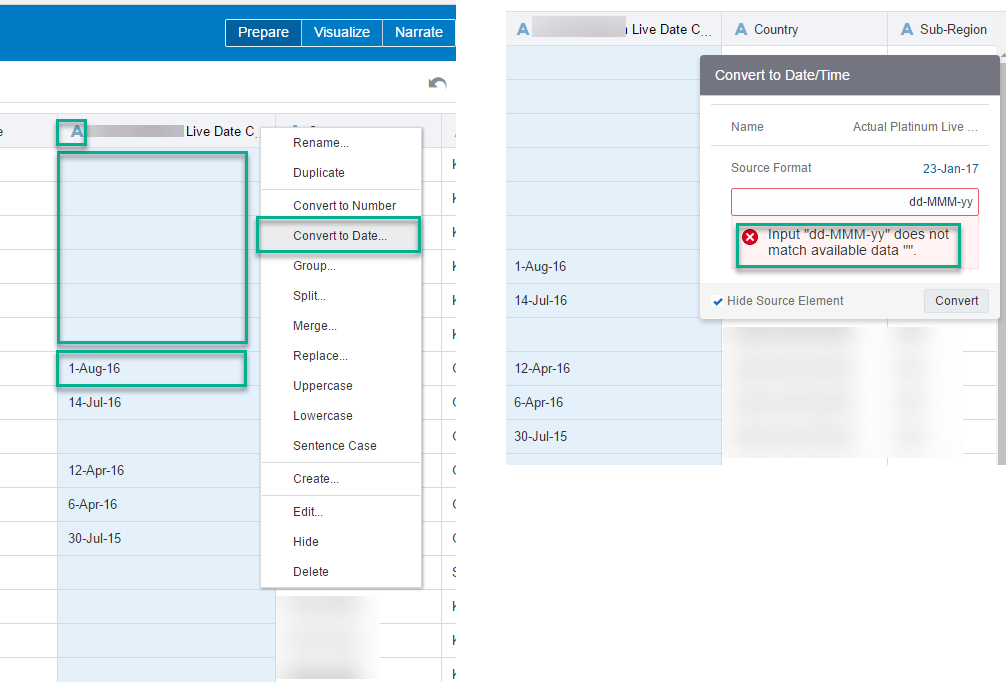
Hi, I'm new to DV and coming up against some issues with the data set I've imported to a new project. Using the DV Desktop app - when looking at the table of data and I click on the column header I get some options. One of those options is to "Convert to Date...". I then get a popup window and when I try to convert the data I face a number of issues.
1) First issue is that the convert option fails as it can't handle "" or null data fields.
2) Second issue is the date conversion is very limited and doesn't support the valid date data that exists in the field such as, failing on "9-Jan-17" for a date format of "dd-MMM-yy" - (it of course works fine for dates that have 2 digits for the dd part such as 19-Jan-17). I've tried other date formats but to no avail.
Any help would be great!
Cheers