Oracle Analytics Idea Lab

Welcome to the Oracle Analytics Community: Please complete your User Profile and upload your Profile Picture

Managing DV dataset visibility through the Administration → Manage Privileges tab Classic Analytics

Needs Votes
51
Views
4
Comments
Jayaram Bodagala
Jayaram Bodagala Rank 2 - Community Beginner
edited May 12, 2025 4:26PM in Oracle Analytics Idea Lab

We have observed that by default, DV datasets appear in the “Create Analysis” list under Classic Analytics in OAC, regardless of specific user and role permissions. To enhance security in Classic Analytics, I propose managing dataset visibility through the “Administration → Manage Privileges” tab.

2
2 votes

Needs Votes · Last Updated

Comments

  • I think the goal here is sharing workbooks with datasets without sharing the datasets for Dataset or Analysis authoring. Is that correct?

  • Jayaram Bodagala
    Jayaram Bodagala Rank 2 - Community Beginner

    Hi @Bret Grinslade - Oracle Analytics-Oracle – that's a great idea. We're also expecting another idea on the Classic Analytics side.
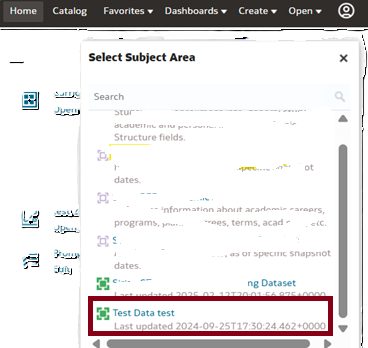
    In Classic Analytics, a user with the BI Content Author role can view Datasets by navigating to: Create → Analysis → Select Subject Area.

    image.png

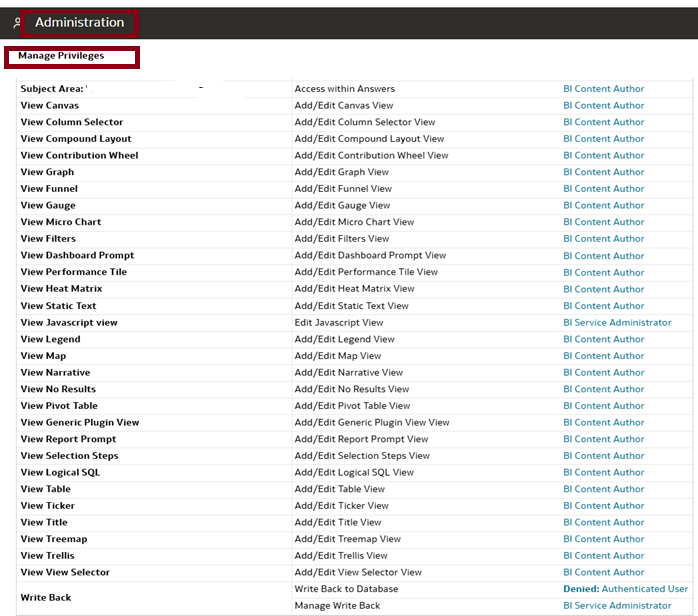
    I would like to propose managing dataset visibility via the 'Administration → Manage Privileges' tab.

    image.png
  • Michal Zima
    Michal Zima Rank 7 - Analytics & AI Coach

    @Jayaram Bodagala Your idea does not make much sense (according to my opinion). Data set permissions are maintained in DV UI (this is logical, since data set is DV object, not a "classical" object like analysis etc…). And benefit of being able to use data set for creation of analysis in "classic" (analytics) UI based on data set is very appreciated by our end users (they mix agility in mapping their data for reporting in OAS with still more mature feature for creating output in classis - analysis/dashboards). And security is implemented here as well - when creating analysis, you have access just to data sests, to which you have permission (via application role or via direct access). You are simply mixing apples and oranges.

  • Jayaram Bodagala
    Jayaram Bodagala Rank 2 - Community Beginner
    edited Feb 18, 2026 10:57PM

    Hi @Michal Zima

    The background of this idea is that the user already has the BI Author role. With this role, users can create Classic Analytics reports using Subject Areas in the OBIEE 12c or OAS environment.

    Currently, we have two functional report areas designed in BI (Finance and HR).

    We have shared a HR Data Visualization (DV) report with the user in read-only access (DV Consumer role). However, since the user already has the BI Author role, they can create reports using Classic Analytics based on Datasets that they have access to.

    To address this, we are proposing to implement stricter access controls to ensure the user can only view the shared DV report and cannot create or access additional reports beyond the intended scope.

    Ex : User have two roles got assigned below are the details

    1. Fin DV reports Role: (only DV Consumer ) user can view only DV reports.
    2. HR Adhoc Reports Roles : (BI Author) Users can create Classic Analytics reports

    Please let me know if have any ideas to resolve this access issue.