Categories
- All Categories
- Oracle Analytics and AI Learning Hub
- 54 Oracle Analytics and AI Sharing Center
- 26 Oracle Analytics and AI Lounge
- 315 Oracle Analytics and AI News
- 58 Oracle Analytics and AI Videos
- 16.4K Oracle Analytics and AI Forums
- 6.7K Oracle Analytics and AI Labs
- Oracle Analytics and AI User Groups
- 120 Oracle Analytics and AI Trainings
- 24 Oracle Analytics and AI Challenge
- Find Partners
- For Partners
Can't resize columns in BIP Microsoft word add-in

In the BI Publisher add in for Microsoft word I'm unable to drag or manually enter width to shrink a column. All I can do is enlarge the column and when I do that it oversizes all columns off the screen and that works for exporting to excel or viewing in HTML format but does not meet requirement for PDF format.
Best Answer
-
Hi Sean
Can you please try the below step and verify the results
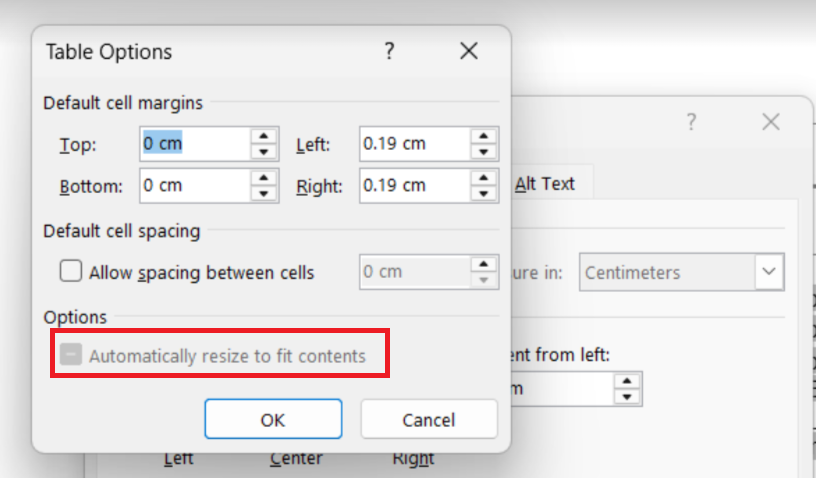
Open the RTF Template in the BI Desktop Builder—>click on Table properties of the column—>Click on Options—>choose the option "Automatically resize to fit contents".
 0
0
Answers
-
Hi @Sean-B-01,
Can you please give some example i.e. screenshot (what is required in ideal case, what issue you are facing) etc. and if possible attach your template, xml (without sensitive data) so that we can replicate in our instance and see if any potential solution is possible or not.
Thank you.
0
