Hi experts,
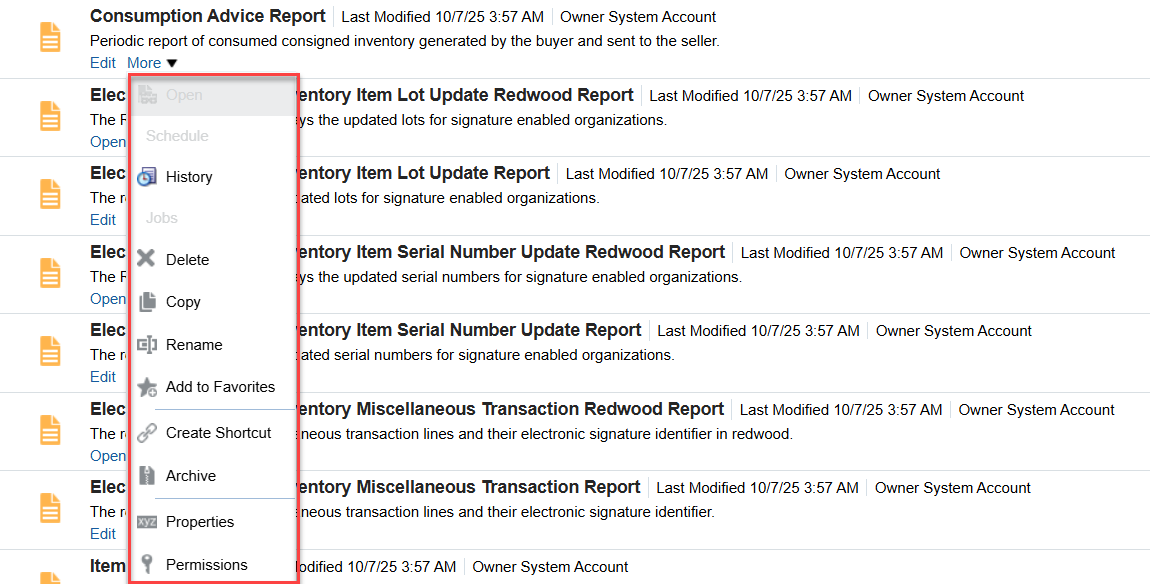
i am trying to open/view the report from OTBI, but the open field is greyed out and when i try to edit and click on view report to open it - nothing is happening. i have all the roles. Please help me out
Thanks,
Srikar
Hello Srikar, These reports are most likely invoked from the application. If you edit one of them and click on Properties button, you can check the "Run Report Online " checkbox and it will make the Open option available in the Catalog.
Thanks Hassan
Hi @Srikar Pusuluri,
Welcome to the Oracle Analytics Community!
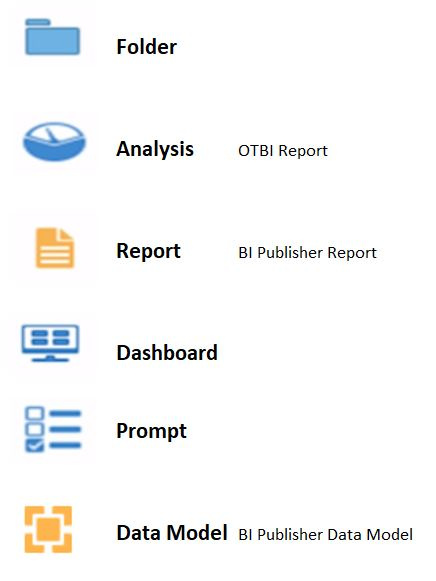
It seems the reports that you highlighted in the above screenshots are BI Publisher Report.
If there is an open button then you can click and the report will open and ask for the parameters to pass if it is parameter enabled but if you don't see the open button then those are called from an ess jobs or scheduled reports.
Hope this help.
Thank you.
Here's an image describing all different icons and their meanings which might be useful for better understanding.
@Srikar Pusuluri , Welcome to the Oracle Analytics Community! These reports are located under Shared Folders/Supply Chain Management / Warehouse Operations/ Inventory. Please confirm.
@Srikar Pusuluri , I just confirmed these indeed belong to Inventory and as far as the Consumption Advice Report is concerned, it basically used in the scheduled process. It is used to create consumption advices from consigned inventory-related transactions.
When to Use
A consumption advice is a periodic summary report of consumption transactions that reports the usage of consigned inventory to the supplier based on a consumption advice frequency.
The consumption advice stores the details needed to communicate information to the supplier such as item quantity and value of the inventory consumed in the warehouse. The consumption advice also serves as the document to initiate financial settlement for the consumed material.
More details about privileges required and parameters to use this report can be found in this oracle doc.
Please feel free to reach out if you have any further questions on this topic. Thanks
Description: Join our Product Management team to learn about new features that are part of 26.R3 Application release of Fusion Data Intelligence (SCM). The session will cover updates on Supply Chain Management and Procurement. Presented by: Anil Sebastian - Senior Director, SCM Product Management, Fusion Data Intelligence…
We would like to understand the reason for the difference in configuration options for the “Send Message to Team” action across the Redwood VBCS Recruiting pages. Currently, we observe the following behavior: On the Job Requisition and Job Requisition List pages, it is possible to hide/remove the “Send Message to Team”…
Is there a way to extract existing BIP reports saved in a specific folder? Like can capture Report Name, Report Path and Owner for example?
Is there a log that can be checked on our side that might help with the issue. I've submitted an SR, however it is currently being bounced around between different areas. Could not establish connection. oracle.xdo.delivery.ssh2.SSHMessageException: Error in decrypting message Current thought is that this is an issue with…
Hello, I'm trying my hand at creating some KPI's and Dashboard Visualizations for the Recruiting Activity Center (RAC) per the following documentation: Flexible Reporting in Redwood Dashboards Redwood Experience: Recruiting Dashboard When I add a session variable to my OTBI reports, I correctly see a value of 0 in my…
'Facility Name' exists in the Recruiting - Recruiting Real Time multiple times with varying usage. Job Requistion -> Job Requisition - Additional Details -> Facility Name Job Requistion -> Location -> Facility Name Is there any reason why these two Facility Names would not exist in the Recruiting - Real Time Events subject…