Oracle Analytics Forum

Welcome to the Oracle Analytics Community: Please complete your User Profile and upload your Profile Picture

Need help - How to show 0 in case null/blank values in row AND how to rename Grand Total column name

Received Response
34
Views
6
Comments
User_MPJ5F
User_MPJ5F Rank 2 - Community Beginner
edited Mar 31, 2026 11:30AM in Oracle Analytics Forum

I am creating report in DV which were previously created using Oracle Classic BI. When creating the table, there are columns where it is showing blank in cells where there are no data. However, in Classic BI the blank cells are shown as 0. When I checked the column properties in Classic BI, it has added Custom format as #,##0;-#,##0;0. But there is no option in DV. Screenshot attached.
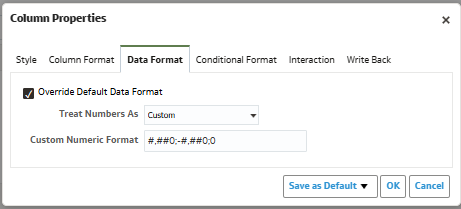
Column Properties.png

Also please suggest, how to rename the Grand Total column. There are two grand totals in my table,

1. Which is supposed to be named as Amount instead of Grand Total Amount and

2. Need to call it as Count instead of Grand Total Count.The Amount column is renamed and is working as expected.

However, when I tried to change the Grand Total Count to "Count", it doesn't change and stays as "Grand Total Count". I thought "Count" must be keyword and tried using other text, but it doesn't change. Screenshot attached, Please suggest.
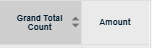
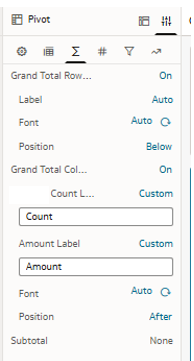
Grand Total Count - 1.png Grand Total Count - 2.png

Answers

  • @User_MPJ5F , Welcome to the Oracle Analytics Community!

    Please see if you can create a calculated measure in DV: NVL("Your Measure", 0)

  • User_MPJ5F
    User_MPJ5F Rank 2 - Community Beginner

    @RVohra It didn't work.

  • As far as I know, this is one of the many aspects where DV is very different than "classic". DV tries to drive you into selecting pre-defined formats, while "classic" let you select some predefined formats or enter your own format mask, therefore supporting the format for the missing value.

    Have you checked in https://community.oracle.com/products/oracleanalytics/categories/idealab-oracle-analytics-cloud-server if there is already an idea asking for that feature? If there isn't one, you can post it. In both case, would be useful to post the link back here, it could generate an extra support and up-votes for the idea.

    For the grand totals labels, what product (and version) are you using? I tried what seems to match your example in a current OAC instance, with a pivot visualization. I can rename both the columns and rows grant total labels doing what your screenshot shows. Therefore you are maybe on a different version or product?

  • User_MPJ5F
    User_MPJ5F Rank 2 - Community Beginner

    @Gianni Ceresa thanks, I'll check on the Oracle Analytics Idea Lab.

    I am currently using Jan'26 version.

    image.png
  • Ok, so for the grand total labels, wait the March 2026 version, it should work there. (That's the one where I tested earlier today)

  • User_MPJ5F
    User_MPJ5F Rank 2 - Community Beginner

    Thanks @Gianni Ceresa for your help.