Hi,
I am working on obiee 11g..
i want add empty row in middle of the rows in analytics report obiee 11g
For example, empty rows marked in the following screen shot..
Please help me,
A.kavya
Hello Kavya,
Use pivot table view or else edit table view of analysis in that click on summation and select after
or else create Report Type report there you have lot of option .
regards
Sandeep
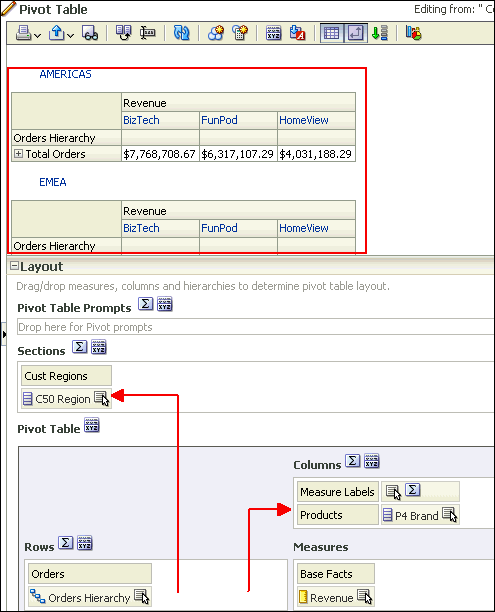
Use a pivot table and put your "title" field in the section space
Richard Chan
Neodata Australia
Take any random measure or dimension from the Subject Area,
And Edit it's formula as,
It will add one empty row in the Report.
Thank You,
Where AI meets business outcomes Oracle AI World brings the Oracle community together to explore how AI and other technology innovations are driving real business outcomes across industries. Discover what’s new through: Mainstage keynotes to hear the latest directly from Oracle leadership Product demonstrations Customer…
I tried the following expression and it blows up when I select more that one value in the list see image
We are using Oracle Analytics Server 2026 with WebLogic Server 14.1.2. Our Account Statement report is accessed through '/xmlpserver'. We need to capture the following details in the OAS/Publisher log files whenever a user runs the report: Username Report name and path Report execution timestamp Account Number From Date To…
We need to download a report with the order number as the file name. In the main report, we have a data action (hyperlink) on each order number. When we click an order number, the linked report is downloaded with the corresponding order details. Currently, the file is downloaded using the report name. We need to download…
Hi all I work in UK healthcare across 30 hospitals nationwide, and we're currently reviewing our Oracle estate and roadmap. Part of that is deciding whether to make a case for investing further in Oracle Analytics Cloud for workforce reporting, or whether OTBI and our existing tools are enough for now. Our HR data sits in…