Categories
- All Categories
- Oracle Analytics and AI Learning Hub
- 54 Oracle Analytics and AI Sharing Center
- 26 Oracle Analytics and AI Lounge
- 314 Oracle Analytics and AI News
- 58 Oracle Analytics and AI Videos
- 16.4K Oracle Analytics and AI Forums
- 6.7K Oracle Analytics and AI Labs
- Oracle Analytics and AI User Groups
- 119 Oracle Analytics and AI Trainings
- 24 Oracle Analytics and AI Challenge
- Find Partners
- For Partners
IE error for OBI12c

Hello Experts,
I am facing a strange issue with OBI.
I am using IE11 to login into OBI, but unfortunately when ever I login I get the blank screen like below.

OBI Version:- Oracle Business Intelligence Product Version 12.2.1.1.0 (Build BIPS-20160604082456 64-bit)
IE Version:- IE 11, 11.1155.15063.0
I have tried below steps to resolve the issue:-
Open IE11 --> open OBIOne page--> Press F12 -->go to Emulation tab --> select Document mode --> 10
But its not working.
Can you please let me know if there is any workaround.
The same link works perfectly ok on Chrome and firefox but not for IE.
Kindly guide am I missing anything.
Regards,
Abhishek
Answers
-
It never worked or it stopped working at some point?
As a side note you maybe want to consider to update to a newer version as 12.2.1.1.0 isn't supported anymore ...
And mainly if you never patched it you can have browser issues as almost every BP contains some fixes for browsers.
0 -
As it works in other browsers then you have confirmed that it is an IE issue.
try clearing browser cache in IE.
0 -
Thank you Gianni, yes we are planning to upgrade and doing POC for 12.2.1.3.0 upgrade.
0 -
Hello Joel,
Correct its an IE issue, but i tried to delete the cache and run it but still no luck.
Thanks again.
0 -
Simple one to try in IE; - make the site a 'trusted site' and then ramp all security to minimal for trusted sites and retest.
0 -
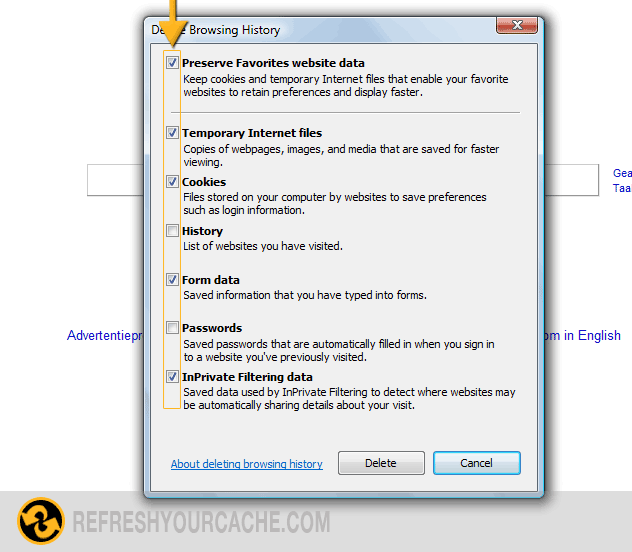
Are you sure you didn't "clear" it while "Preserve Favorites website date" was still ON?
 0
0 -
We use IE 11.0.9600.19035 with OBIEE 12.2.1.1.0 and it works fine. Sometimes we receive caching issues with IE. We use below given script to clear the cache.
ECHO **** Clearing Internet Explorer cache ****
taskkill /F /IM "iexplore.exe">nul 2>&1
set internetTempDir="C:\Users\%USERNAME%\AppData\Local\Microsoft\Windows\Temporary Internet Files"
set internetCacheDir= "C:\Users\%USERNAME%\AppData\Local\Microsoft\Windows\Caches"
echo "Clean history"
RunDll32.exe InetCpl.cpl,ClearMyTracksByProcess 1
RunDll32.exe InetCpl.cpl,ClearMyTracksByProcess 8
del /q /f "%internetTempDir%">nul 2>&1
del /q /f "%internetCacheDir%">nul 2>&1
ECHO **** Clearing Internet Explorer cache DONE ****
0

