Categories
- All Categories
- Oracle Analytics and AI Learning Hub
- 34 Oracle Analytics and AI Sharing Center
- 20 Oracle Analytics and AI Lounge
- 273 Oracle Analytics and AI News
- 48 Oracle Analytics and AI Videos
- 16.2K Oracle Analytics and AI Forums
- 6.3K Oracle Analytics and AI Idea Labs
- Oracle Analytics and AI User Groups
- 100 Oracle Analytics and AI Trainings
- 16 Oracle Analytics and AI Challenge
- Find Partners
- For Partners
Welcome to the Oracle Analytics Community: Please complete your User Profile and upload your Profile Picture
Help with Filters using Classic Mode
user6392629
Rank 1 - Community Starter
I'm trying to write a filter for the following:
- Should only pull courses with available seats of Greater or Equal to 1.
- Should only pull courses where the CRSE NUMB = 1 with the following exceptions:
- Subj Code = HISP, Crse Number less than 209
- Subj Code = GERM, Crs Number = 181, 210, 220, 221 240
- Subj Code = FFS, Crse Number less than 214
- Subj Code = CHIN, HEBR, JAPA, Crse Number = 205
- Subj Code = MATH, Crse Number = 220, 221
- Subj Code = RUSS, Crse Number = 210
- Subj Code = WFQS, Crse Number = 201
Of course the first 2 are easy, but when I try to do the rest, it doesn't return the correct results. There isn't any way to add () that I can see.
Any help would be appreciated.
Thanks,
Gary

Tagged:
0
Answers
-
Create 1 filter then in the Filter interface click the sql button and write your full filter using ands / ors
0 -
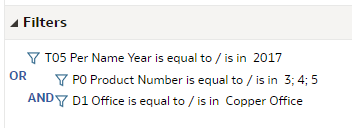
The ( ... ) in a filter is achieved by clicking on the "AND" or "OR" to make them "sub conditions" (indentations = ( ) ).
You can also adjust the XML of your analysis if needed in case you get lost while clicking "AND" or "OR" to make blocks of conditions, because mainly the first time it takes a bit to get the expected result.
0