Categories
- All Categories
- Oracle Analytics and AI Learning Hub
- 44 Oracle Analytics and AI Sharing Center
- 20 Oracle Analytics and AI Lounge
- 278 Oracle Analytics and AI News
- 56 Oracle Analytics and AI Videos
- 16.2K Oracle Analytics and AI Forums
- 6.4K Oracle Analytics and AI Labs
- Oracle Analytics and AI User Groups
- 103 Oracle Analytics and AI Trainings
- 20 Oracle Analytics and AI Challenge
- Find Partners
- For Partners
OAC Parameter Initial Value Can't be Blank
I am following the instruction here https://docs.oracle.com/en/cloud/paas/analytics-cloud/acubi/create-parameter.html .
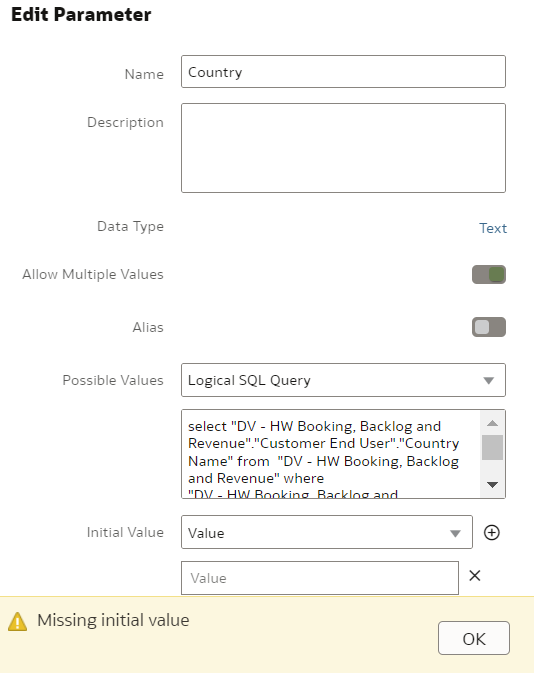
In the Initial Value field, I don't want to use an initial value, I select value and leave the value blank. I am getting following error message.
If initial value can't set to be blank, is there other way for me not set initial value and to use all values?
Comments
-
In the initial value can you use Logical SQL Query to bring all the values
0 -
What if all values have over 30+ items?
And in expression filter what should I put as default value in this case?
@parameter("parameter name")('default value')0 -
Allowing empty initial value was introduced in the May update. In your example, since you selected 'Allow multiple values', the system created a dummy first value (which is empty), just delete that value using the X next to it, and you should be fine. Make sure that you are on the May update.
Parameters with 'Allow Multi Select' can have multiple values returned in the initial value logical SQL; a single select will take the first one if multiple values are returned.
Not sure what was the question from the last user, but questions are better addressed in the Forum vs. the Idealab.
0

