How to Left Align all contents Header as well as Rows in Table Visualization in NSAW Workbook?
Hi @Vismay Barot ,
Currently, this functionality is not available but there is an Enhancement Request in the Ideas Lab here:
The available adjustments you can make are documented here: https://docs.oracle.com/en/cloud/paas/analytics-cloud/acubi/adjust-visualization-properties.html#GUID-C22904E8-D778-4818-BAA5-8376478041F5
If you find this reply to your question useful, others might as well. By clicking the “Yes” button for “Did this answer the question?” below, you’ll be able to help the community members who might have a similar concern find the answer easier.
Regards,
John
Thank You so much John for your Prompt response, just so we're on the same page, wanted to clarify that, I am okay with Left Aligning everything and not just limited to 1 column.
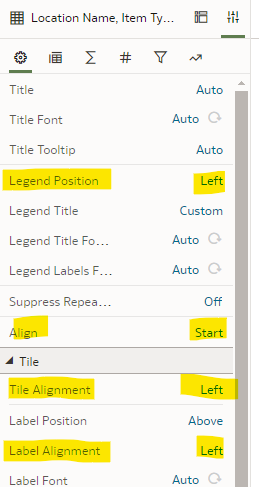
Also, I was wondering if any of these would be useful for the same:
Hi @Vismay Barot,
Yes, you are in the right area and these are all customizable. It looks like you have a basic Tabular Workbook, so formatting is not as important as the other Data Visualizations where the look and feel is just as important as seeing the data.
Sorry, just to clear some air:
I am not using Tableau, it's NSAW Workbook (from OAC Console) and above screenshots are from here itself:
in which if you can see
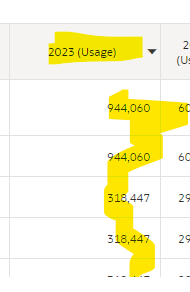
Table Header (Highlighted Yellow) needs to be Left Centered
Table Rows (Highlighted Green) needs to be Left Centered
So, I was wondering if this is a possibility or not.
If yes, please let me know a workaround.
Thank You 😊
Yes, I understand. This is OAC functionality and the functionality is as mentioned earlier.
Explore how to build agents using code in AI Data Platform. We'll create an agent that examines and analyzes the contents of a Github repository and reports its findings. The session demonstrates how to use different developer tools to create agents including the AIDP extension for VS Code and Codex. Using these tools we…
What is wrong with this code
Am I missing something or is there no way to search through previous posts to make sure I don't duplicate a question? All I see on the filter options are tags or status… a general search for a word or phrase would be helpful.
We were under the impression that when exporting a visualization in DV to CSV format hidden columns would be include from the grammar panel. This is not happening. See below for a screenshot showing 3 hidden columns that do not appear when exporting the pivot table to CSV. This seems to have worked a month or so back but…
Migrated RPD from obiee12c to OAS 2024. post migration when we try to access dashboards on OAS we are getting below error: State: HY000. Code: 10058. [NQODBC] [SQL_STATE: HY000] [nQSError: 10058] A general error has occurred. (HY000) State: HY000. Code: 43275. [nQSError: 43275] Message returned from OBIS…
There is no option for legend title in many visualization types.