Categories
- All Categories
- Oracle Analytics and AI Learning Hub
- 34 Oracle Analytics and AI Sharing Center
- 22 Oracle Analytics and AI Lounge
- 276 Oracle Analytics and AI News
- 47 Oracle Analytics and AI Videos
- 16.1K Oracle Analytics and AI Forums
- 6.3K Oracle Analytics and AI Idea Labs
- Oracle Analytics and AI User Groups
- 99 Oracle Analytics and AI Trainings
- 16 Oracle Analytics and AI Challenge
- Find Partners
- For Partners
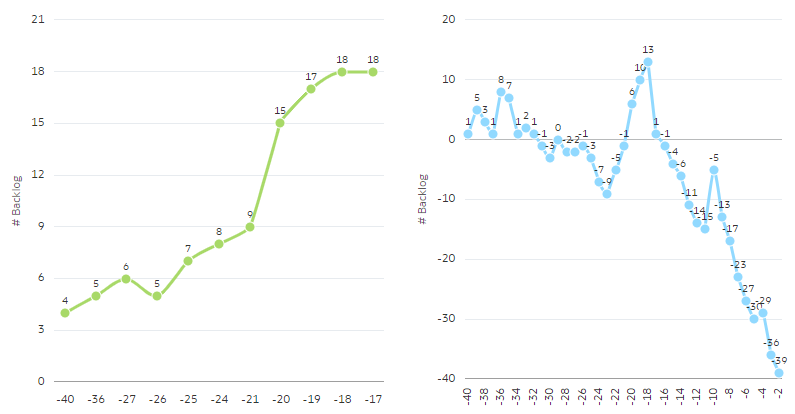
When we add multiple measures, chart should not display if there is no values.
We should have option not show the line for null values.
In Line diagram it is showing all values for all measures even though we don't have values for it. In the attached example, after week 20 , there is no value for green lines. But it is showing continuous line.
In overlay diagram it is showing zero. No option to not to show as Gap.
Comments
-
Have you tried this option? but I think your request is not for Gap, you are asking that it use the same value as the previous value in case there is a Null. It is different from Gap and should be solved in the definition of the measure/calculations.
0 -
Yes , My issue is using same value even though it is Null.
If I plot two different line DVs, it looks below.
But If I add same measures in one DV, It is not ignoring nulls.
Can you suggest how it can be solved in Calculation/Measure definition?
0 -
Hi,
Same happened to me as well. It would be good to have a solution.
Best regards,
Jorge
1 -
@Rajakumar Burra can you share an example dataset? I was not able to create the same outcome.
0 -
@Jorge Olmeda Do you have any quick example. I am unable to reproduce now.
0