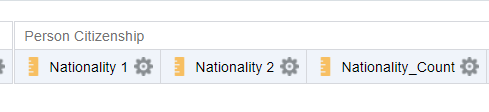
I have a requirement where I need all the nationalities of a person in a single row. Ideally when we fetch the citizenship we get multiple rows. We have tried RCOUNT and PIVOTTING Results but no luck. Has anyone achieved this already?
Hi @Vibha Pandey - Oracle ,
I have had a similar question in the past, but the problem was that all Nationalities were displayed but only the current one was desired. This is explained in a little more detail in Doc ID 3021065.1.
Diversity Analysis includes 'Country Of Citizenship' and it will show all citizenships (nationalities) by default. If you want to filter out expired citizenships, you can use the filter: Citizenship Status Code = E (expired) (CITIZENSHIP_STATUS).
Hope that helps.
Regards,
John
Thanks John!
My client has a population where dual citizenship is common. I need both of them on the report and in one single row. Something like Nationality1, Nationality2.
Hi @Vibha Pandey - Oracle Did you manage to get the multiple nationalities in a single row? I am having a similar use case and not able to achieve the desired output.
Hi @Madhura Saurabh Mirikar,
Welcome to the Oracle Analytics Community!
As it is an year old post (and if you are not able to receive any answer), I would recommend you to raise a new question with all relevant details like issue details, screenshot (without sensitive data) etc. so that someone can able to help you.
Thank you.
I agree it is better to start a new discussion instead of updating a year old post.
In any case regarding your question, OTBI cannot natively return multiple citizenships/nationalities in a single row for a person. But you can achieve it using BI Publisher (LISTAGG), a Data Model, or a custom SQL-based subject area, because OTBI does not support dynamic row-to-column pivoting or string aggregation.
Hope it helps!
Hi, I'm new to OTBI & FDI and need your help. Is it possible to do a report to identify missing default expense account in FDI or OTBI? Thanks for your help.
Hi Team We are using SCM- Maintenance subject areas for reporting . We enabled the Asset related DFFs (CSE_ASSETS_B) under Data Configuration successfully but the Asset DFFs are not reflecting under Descriptive Flexfield Folder . We do not see any Asset folder even under the Descriptive Flexfield folder . Please advise if…
We made some changes in the Fusion UI, and those changes were reflected correctly in OTBI but not in FDI. To refresh the data in FDI, the Oracle support team advised me to reload the relevant functional area (Absence Management). I navigated to Application Administration → Human Capital Management, selected Absence…
Data are synchronized with Oracle HCM and I can see PN 2470, which was terminated in the past. If I add any assignment information I find no records, why?
In an analysis/report, when the Bottom Up Manager details are selected from the hierarchy, the Top Position Person record drops out. This is due to the fact that this top level position does not have a record in the Fusion table : PER_MANAGER_HRCHY_CF which is the source to load OAX$OAC.DW_MANAGER_CF_DH . The requirement…