Sep 2024 update came with parameter creation and binding for derived dates.
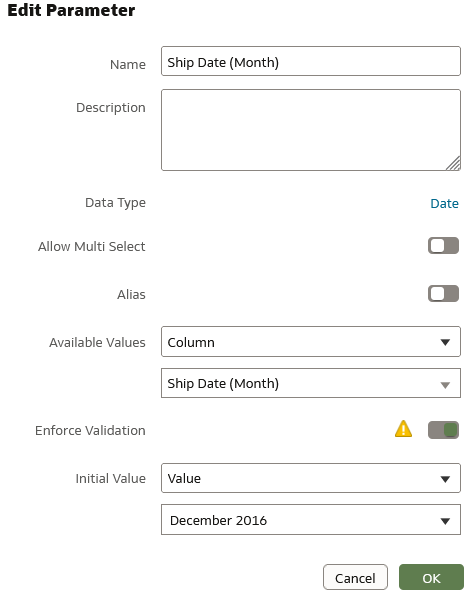
Created below parameter.
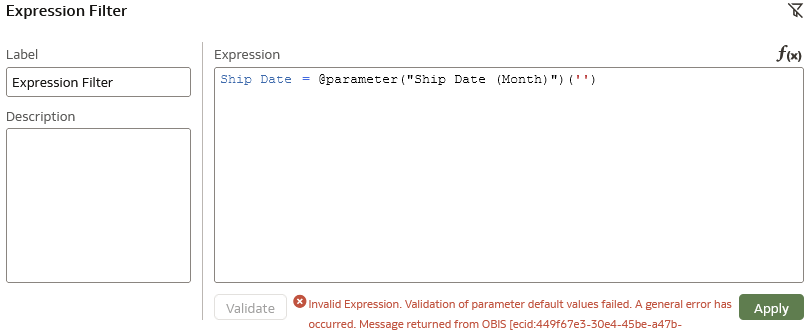
I want to use above parameter in expression filter. I am unable to use it calculation or expression filter.
Help is appreciated.
I have played around it. After reviewing Logical SQL i found answer.
Solution is
Hi @Rajakumar Burra
You may need to CAST it to a matching data type.
Create a Date Part Parameter in Oracle Analytics
[EDIT UPDATE: I was doing a little testing (November 2024) and even with simple text parameters, the syntax validation was failing]
@Avinash Krishnaram-Oracle - Any known issues you are aware of, I did not spot any.
Hi @Rajakumar Burra I too observed EXTRACTMONTH in the LSQL, but I would not have guessed to add 'timestamp' prior to the default. Thanks for sharing your solution with the community.
Thank you for sharing the solution!
Description: Join the OCI Enterprise AI Product Management team for a deep dive into the latest product roadmap updates and upcoming innovations. During this webinar, we’ll cover key roadmap highlights, showcase product demos, and share insights into what’s ahead for OCI Enterprise AI. The session will conclude with a live…
Hi! I am looking for audit logging for Analytics objects, such as users creating, modifying, or deleting datasets, dataflows, schedules, etc. The traditional Presentation Services component provides such logging in domains/oas/servers/obips1/logs/auditjson.log, which contains audit information for catalog objects,…
I'm trying to index a Local Subject Area so I can use it in my AI Agent, however, I keep receiving the generic error below. Request status(500) : error = {"prefix":"DSS","code":50000,"message":"There was an unexpected error while processing this request. Please try again."}
it is observed that in OAC while using case statements the output is not expected.For example if we have a case statment like case when table1.column1=table2.column1 then 'yes' else 'No' end as Attribute1 Now if i use this attribute with a fact-amount column attribute 1|| Amount on a report then we dont get the aggregation…
Once I select that value from the list box Region I created, I want to filter the table by my selection. See the images