Categories
- All Categories
- Oracle Analytics and AI Learning Hub
- 44 Oracle Analytics and AI Sharing Center
- 20 Oracle Analytics and AI Lounge
- 278 Oracle Analytics and AI News
- 55 Oracle Analytics and AI Videos
- 16.2K Oracle Analytics and AI Forums
- 6.4K Oracle Analytics and AI Labs
- Oracle Analytics and AI User Groups
- 103 Oracle Analytics and AI Trainings
- 20 Oracle Analytics and AI Challenge
- Find Partners
- For Partners
Incorrect Difference from Two Calculations
Hello,
I am using Oracle Analytics Desktop and attempting to get the difference of two calculations as follows:
Calculation 1: COUNT(CD_CUSTOMER) = 1,064,910
Calculation 2: COUNT(CUSTOMERNUMBER) = 526,568
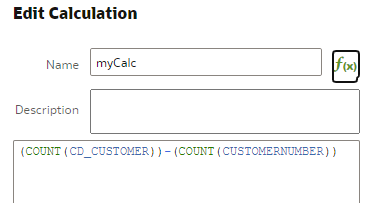
To get the difference of these two, I am dragging and dropping them into a new Edit Calculation window which pastes as:
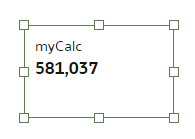
(COUNT(CD_CUSTOMER)) - (COUNT(CUSTOMERNUMBER)). But the result is 581,037 instead of 538,342.
Why is the result coming out wrong? (There are no NULL values in both tables in play and CD_CUSTOMER and CUSTOMERNUMBER are distinct).
Best Answer
-
@Mirithu -
The mismatch between your expected difference (538,342) and the result (581,037) suggests that the counts are being aggregated differently due to either:
- A difference in the granularity of the calculations.
- Overlapping or duplicate data due to join conditions or aggregation context.
By verifying the aggregation context, inspecting joins, and validating the raw data, you should be able to pinpoint the issue and correct the calculation.
1
Answers
-
Hi @Mirithu ,
Can you please tell us something more about the dataset? Does it have multiple tables? How did you join them? Are the columns coming from different tables?
0 -
Just a thought (may not be your question), you are already positive that functionally, you don't need count distincts in your calc, right ?
Technically (COUNT(CD_CUSTOMER)) - (COUNT(CUSTOMERNUMBER)) will simply show a difference of how many rows have non null CD_Customer vs how many of these rows (assuming same star) have non null CUSTOMERNUMBER. Just checking.
1 -
Thank you @Sumanth V -Oracle
The issue lies with the join used (though there are no duplicates).
I removed all columns and left only the two but still got incorrect value. Then I changed to FULL OUTER join and the result is correct (LEFT, RIGHT and INNER were all giving different wrong results).
I thought the calculations' resultant explicit values are what are used to compute the difference. I will have to understand how the joins are evaluated.0 -
If you say the values are different use count(distinct variable) in both cases and it should work.0