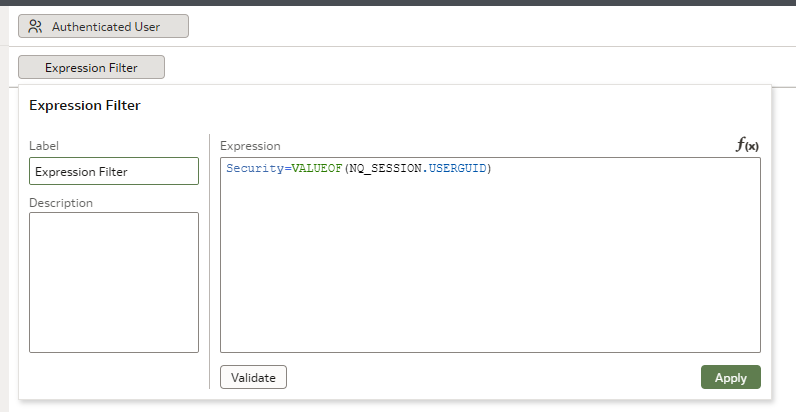
We are getting inconsistent behavior trying to use Session Variables in Datasets Expression Filters.
Anyone have success?
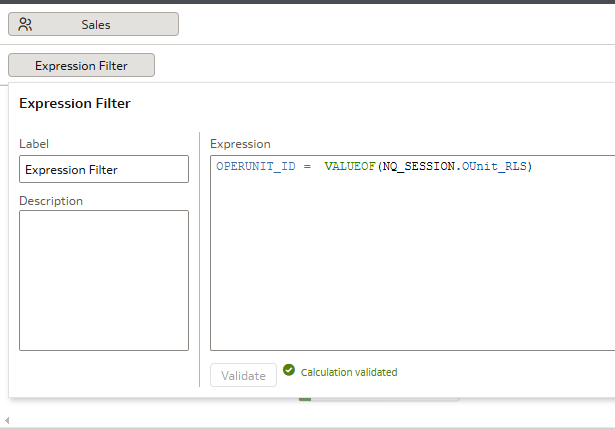
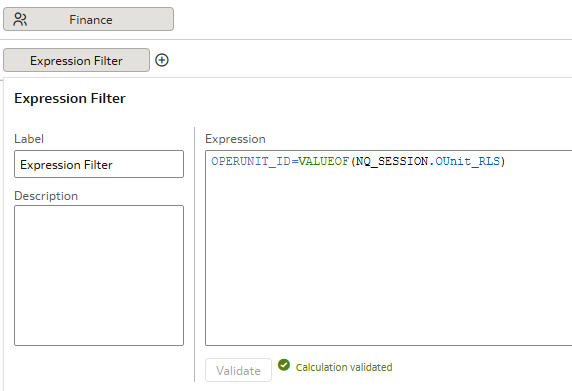
So… If I remove the space before and after equal sign it works
Hi Wayne,
How did you get the first one to parse in the first place? In all test cases I tried it is shown as unsupported.
Hi,
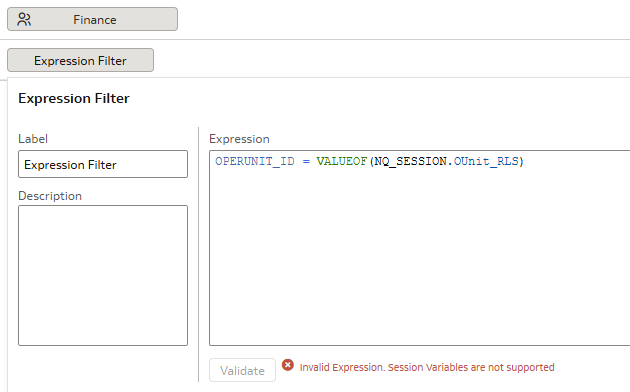
I never managed to get a valid validation, always got the "Invalid Expression. Session variables are not supported".
And I tried a number of times…
@Christian Berg-0racle - got lucky. I can get you in a zoom call to show you. First one was done by one of my colleagues and he nor I cannot replicate (my second screen cap) in different dataset.
His first one actually works which is great.
Interesting… We were able to copy the reference to Session Variable out of working into different Dataset and it Validated.
Now I'm curious: when it validate, does it work as expected?
Because if it does, I'm very much curious to know why the not-validating message is that the session variables are not supported there.
"His first one actually works which is great."
No it's not it's rather extremely preoccupying 🤣 I'll try to use the copy+paste approach in a sample.
Update: It works when you write it without any space. h/t to @Gianni Ceresa
Imagine how great it would be if we could still see the raw object definition to find out just how that JSON is written and what the interface tries to write today…
Thanks Wayne for the 'space' hint, that is the key to get it validated.
The fun thing is that the validation error doesn't come from the backend, it's a front-end limitation.
With a space after the '=' the front-end javascript doesn't even send a request to /ui/dv/ui/api/v1/queryvalidation/wheresto check for validation, it does display the error directly. I'm quite sure that if I send a validation request to that URL (it's a POST call to that URL) with the space, it will probably return result: 'pass'as well.
/ui/dv/ui/api/v1/queryvalidation/wheres
result: 'pass'
Therefore, I would say it's a bug: a front-end javascript check isn't aligned with the back-end check.
And confirmed!
/ui/dv/ui/api/v1/queryvalidation/whereswill happily validate the usage of a session variable there, even spaces around the = .
It's really just the front-end blocking the validation, and not even sending the async call to the back-end for it.
Description: Join our Product Management team to learn about new features that are part of 26.R3 Application release of Fusion Data Intelligence (SCM). The session will cover updates on Supply Chain Management and Procurement. Presented by: Anil Sebastian - Senior Director, SCM Product Management, Fusion Data Intelligence…
Good day, please kindly assist. We are creating a graph to calculate the number of assets per milestones. However, the planners have only populated assets for only one milestone from the list of milestones the customer wants to track. Which gives an incorrect view as the project moves past different milestones that it has…
I scheduled the report in OTBI and the agent was run successfully. However, I do not receive the report after the run in my inbox. The addresses are properly recorded, and the report is in an excel format and saved as a pivot table in otbi. What can be the cause?
Anyone has any idea why the OAC documentation on custom viz is not available now? I was able to access till last week - https://docs.oracle.com/en/cloud/paas/analytics-cloud/acsdv/build-package-extension.html. Does this mean OAC doesnt support custom viz or custom workbook extensions?
I made a parameter with letter range values… put it into a dashboard filter. Then I created an expression filter to bind it to my last name column in the table with the image I uploaded here. I am getting the following error??? Invalid Expression. Validation of parameter values failed. A general error has occurred. Message…
Does Oracle Analytics Server 2026 include AI features such as a built-in chatbot or AI Assistant? If not, are there any plans or indications that these AI capabilities will be introduced in a future OAS release?

![Photo of [Deleted User]](https://us.v-cdn.net/6037859/uploads/defaultavatar/nT2GKTLRQJ3P1.jpg)