Categories
- All Categories
- Oracle Analytics and AI Learning Hub
- 44 Oracle Analytics and AI Sharing Center
- 20 Oracle Analytics and AI Lounge
- 278 Oracle Analytics and AI News
- 56 Oracle Analytics and AI Videos
- 16.2K Oracle Analytics and AI Forums
- 6.4K Oracle Analytics and AI Labs
- Oracle Analytics and AI User Groups
- 103 Oracle Analytics and AI Trainings
- 20 Oracle Analytics and AI Challenge
- Find Partners
- For Partners
Deeplinks why cant I get it to work with the record number as the Oracle SCM guide suggests
Im trying to open a work order edit screen from an OTBI report.
the Oracle guides seem to suggest that the number can be used as the objKey
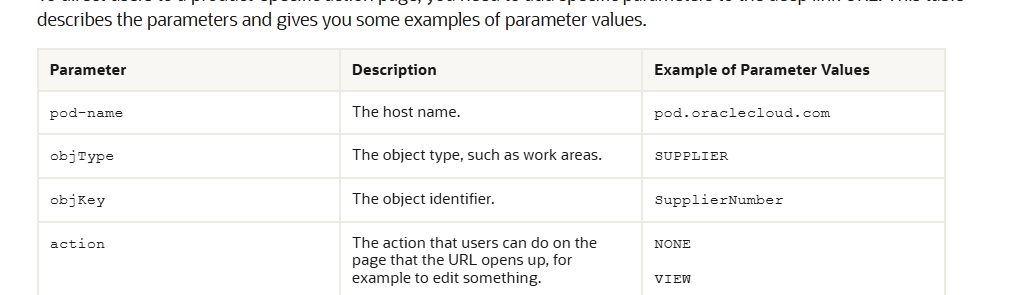
Or in my case the work order number

Trying to get it to work as follow using the WONumber column has not worked
/faces/deeplink?objType=ORA_MNT_WORK_ORDER&action=EDIT&objKey=workOrderNumber=@{3}
I can onlyget it to work on the WOId column as follow
/faces/deeplink?objType=ORA_MNT_WORK_ORDER&action=EDIT&objKey=workOrderId=@{3}
The problem is I have many SQL converted Analysis, so adding the Id column would mean I would have to rebuild everything, so hoping I can launch the work order edit
also in some subject areas like work order cost realtime there is no Work Order Id column.
Please show me the right objKey name to use the work order number

Best Answer
-
Thanks Bhaskar, that has helped with a PO link I was struggling with. Not a solution for opening a work order with the work order number, I think I will need to resort to updating the sql and rebuilding the reports.
0
Answers
-
Hi @Hylton,
Please take a look in the following post and also into the attached document.
Hope this help.
Thank you.
0


