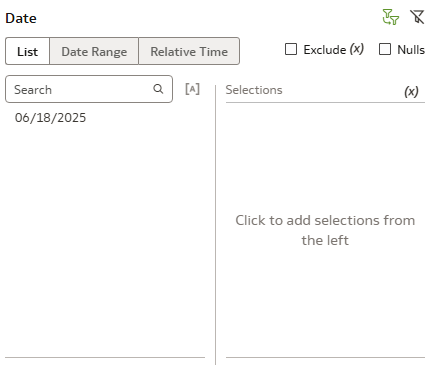
By default, in our headcount report, we are only able to see current date in the date filter. How can we modify change this so users can filter for headcount on a specified date.
I also experienced this challenge .. the only solution I found was to click the green filter box in the upper right hand corner, and select "None". This opened the selection options.
Hi Advanced Tab > Prefix
SET VARIABLE PARAM_EFFECTIVE_DATE can be used to run report as at a specific date. EG to run report as at 2021-01-01 : SET VARIABLE PARAM_EFFECTIVE_DATE= '2021-01-01';
For users to set the date - set up a dashboard prompt and set the results to a presentation variable eg VAR_DATE
Then just use this in the prefix (below also defaults to todays date if no value entered)
SET VARIABLE PARAM_EFFECTIVE_DATE= '@{VAR_DATE}{@{system.currentTime}[YYYY-MM-DD]}';
Hi @Anna Aj
Thanks for using Oracle communities.
Can you share me more details about out of box report name/dashboard for the further review?
Regards,
Arjun
Hi @Mallikarjuna Kuppauru-Oracle
Thanks for your response. It is a custom dashboard not out of the box.
We used the Headcount metric in HCM Workforce Core to generate the Employee Headcount. Users are only able to filter by the current date; they are requesting to the ability to filter an as-of-date so they can view historical headcount.
@Jennifer Nakata thanks, this worked.
Where AI meets business outcomes Oracle AI World brings the Oracle community together to explore how AI and other technology innovations are driving real business outcomes across industries. Discover what’s new through: Mainstage keynotes to hear the latest directly from Oracle leadership Product demonstrations Customer…
HI, I am trying to get data from the Enterprise Contracts - Contracts subject area in FDI. However, it is not returning any records when I use this subject area. Are there additional configurations or setup tasks needed to pull enterprise contracts data in FDI? I have checked the following: In Oracle fusion, I have access…
How to Inject external data (Business central data) into Oracle Autonomous lakehouse via SFTP connector in FDI?
OOTB subject area fields are not available in DEV and PROD. Existing workbooks display "Error Loading Data" and report that standard fields are cannot be found. Local Subject Areas also display "Schema listing not available". The issue appears to affect the FDI semantic layer/metadata across environments. Can anyone facing…
I’m currently facing an issue with the Absence data in FDI. For example, in the screenshot, the Approved Absence measure is showing 1, while the correct value in Fusion 1,560. A few points: This is the standard/prebuilt dashboard; no customizations were made. There is no date filter applied. The FDI refresh runs daily, so…
Report 1 :We do have FRS report with 7 to 8 columns.HTML veiw of the report showing extra space .how to fit the output to the report .There should not be space in the html report.Attaching the report output. Report 1 output : Report2 : We do have an FRS Report where one connection has all ledgers except CSG IND STAT…