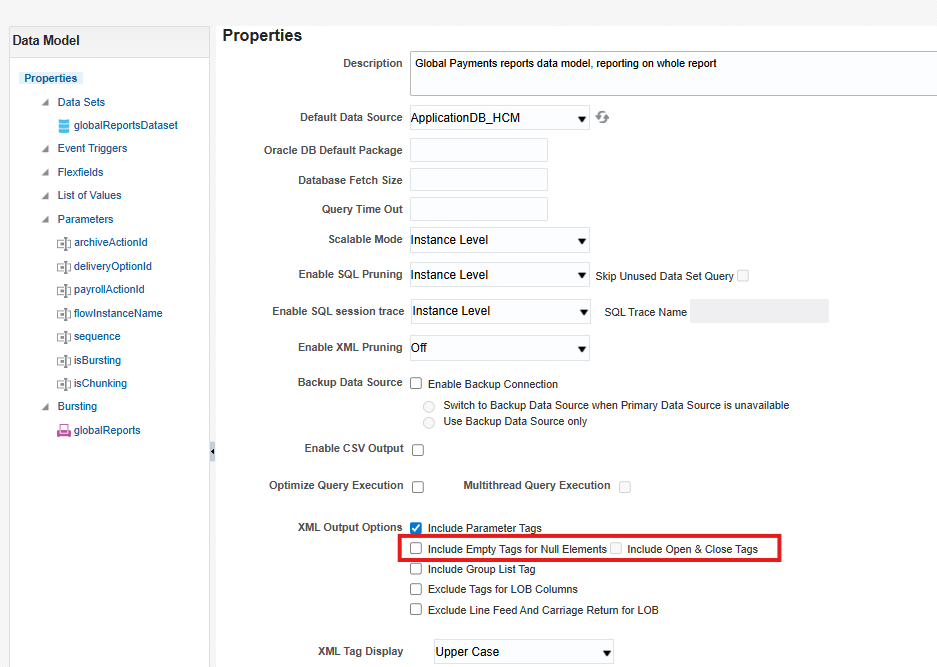
I have tried unchecking , still generating these characters in the front for each row.
Hello Ramani, Is the snippet you shared from the XML file or the output file when scheduling the report? Thank you Hassan
Output file
Welcome to Oracle Analytics Community.
Can you share a screen shot from output to show how it looks? Normally this will be a template issue rather than a DM issue. Please check your template once.
Thanks.
Hi Mandeep,
Agreed, it's just template. It was working fine before and I just made one small change and upload again. I have removed few elseif's. that's the only change I did.
If TermDate IS NOT NULL and Asg_Action <> ‘GLB_TRANSFER’
Then
If Termination_Reason = 'ADMIN' Then 'ADM'
Else If Termination_Reason = 'ATTENDANCE' Then 'ATT'
Else If Termination_Reason = 'FAILED_DRUGS' Then 'FDT'
Else If Termination_Reason = 'LAYOFF' Then 'LAY'
Else If Termination_Reason = 'MISCONDUCT' Then 'CON'
Else If Termination_Reason = 'UNSATIS_PERF' Then 'UNS'
end if
Try the below:
Suppress Blank Lines with <?if:condition?>...<?end if?> Use inline formatting like:
<?if:FIELD!=''?><?FIELD?><?end if?>
Check the below:
Setting Report Processing and Output Document Properties
Hi Ryaz,
Thank you for the suggestion, the template has lot of if statements, when I applied to the one I made changes it didn't work. I have done modification to the original one again very carefully and it worked this time in development and crossing fingers it will work in Production.
Thanks for the update. So, possibly the issue was due to incorrect update of the template.
If my response has answered your question or assisted you with your concern, please click"yes" below to accept the answer or comment with any additional queries. You can also read the Cloud Customer Connect Guidelines for https://community.oracle.com/customerconnect/kb/articles/1-accepted-answer
Description: The Oracle Fusion Data Intelligence (FDI) Product Roadmap Update provides an overview of the latest developments and future plans for FDI. Oracle Product Management experts will share upcoming capabilities, key enhancements, and product direction, helping attendees understand what is changing and how these…
We have a Talent Community Pool configured with Organization and Job Family criteria. Some candidates were added to the pool, but we are unable to determine which specific criterion they matched. Is there a report, analysis subject area, audit history, or backend table that shows the attribute values that resulted in a…
Hi, We are looking for PVOs for below tables in BICC Can you guide us on the approach to extract data for these? PON_AGREEMENT_LINES_ALL PON_AGREEMENTS_ALL PON_APPROVAL_HISTORY PON_CONTRACT_PARTIES PON_PRICING_TERMS PON_TERMS_AND_CLAUSES Thanks, Nitin
Hi All, We are using Oracle Fusion Cloud Procurement and would like to secure the Purchase Order (PO) PDF that is generated from Oracle Fusion. Our requirement is to have the generated PO PDF password-protected, so that the recipient must enter a password before the PDF can be opened. Can someone please advise? We are…
Does Fusion release supports propagating an HTTP XML Feed authentication exception into the BIP-based ESS job’s completion text.