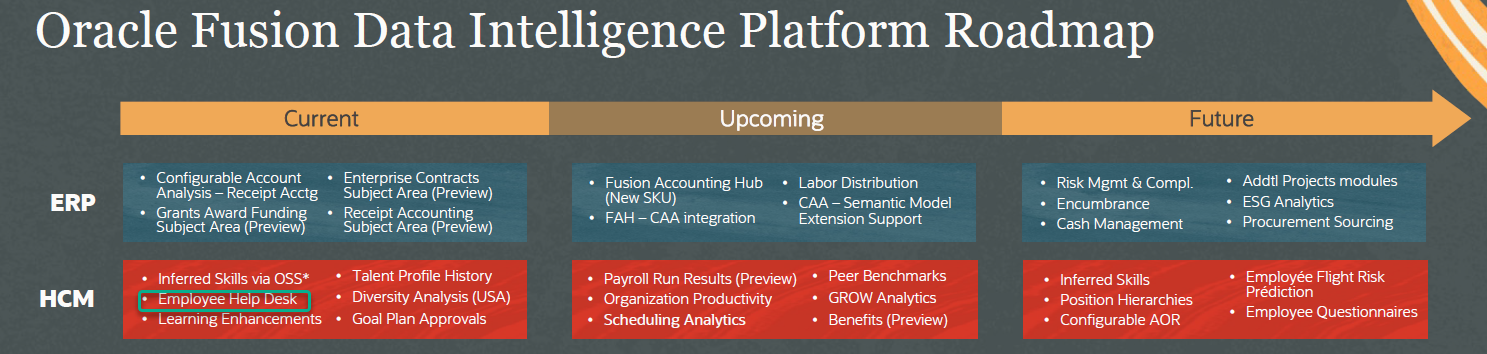
Employee Help Desk appears in the current column of the Fusion Analytics Roadmap. where can we find more information on this module?
Victor
@RanaAshutosh-Oracle Thanks Rana , However , we are looking for documentation of the Fusion Analytics module
Hi @User_6H96B We are in the process of designing and development of HR Help Desk subject area in HCM FDI. This is in our 24B roadmap. Will keep you posted as soon we announce the delivery of that. Please reach out to me if you have any specific use case around HR HD Analytics to solve in your organization. I can try to add that to scope now, if not later.
Raghu
Hi @Victor H happy to announce that HR Help Desk subject area is available in Release 24R2 of HCM FDI. I hereby share a sample dv output for reference. It is in Self-Enablement Preview currently.
Hi @Mayron
Thanks for the answer @Raghavendra Raghunath-Oracle
Yes, I’m asking if anything changed with the tables. We haven’t upgraded to Redwood yet; however, I can see data in FDI in my DEV environment, but the data is not updating.
I’ve tried running processes, adding privileges, refreshing, and reloading the data, but nothing has worked. It stopped updating some months ago (not sure exactly when). The PROD environment has never shown any data at all. Both Fusion environments are in classic UI.
Thanks, Mayron
@Mayron
I’m not sure if this is relevant, but we recently had a similar issue with the HR Help Desk subject area. New Help Desk Agents who started in July weren’t appearing in the FDI data—even after we reloaded it—though they did appear in the OTBI Help Desk data.
When we opened an FDI ticket, the team told us it was actually an HCM Fusion issue. We then had to open a second ticket, and were informed that the Audit Policies under Setup and Maintenance needed to be turned on for HR Help Desk. You might want to check whether Audit Policies are enabled for your group as well.
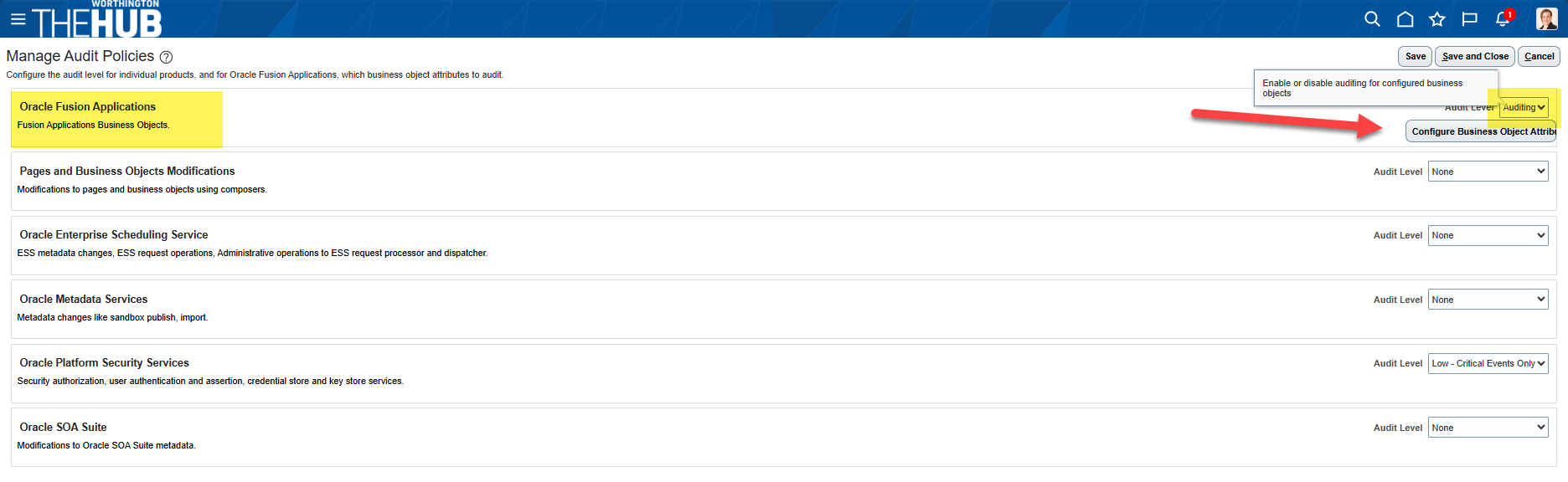
I’ve included the instructions below. After we synchronized the Audit Policies and reloaded the data in FDI, the missing data populated correctly.
Setup and Maintenance > Manage Audit Policies > Oracle Fusion Applications > Audit Level = Auditing > Click Configure Business Object Attributes
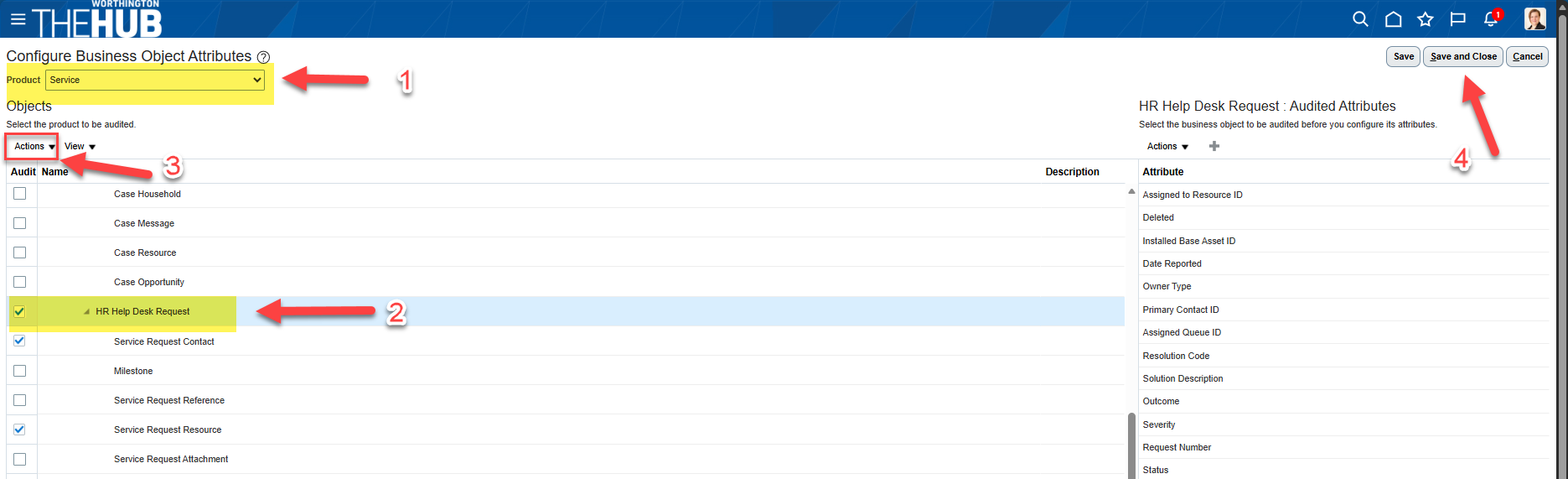
Under Product select Service > Click checkbox for HR Help Desk Request > Click Actions then Synchronize > Save and Close (you may need to also Save and Close from the Manage Audit Policies screen as well)
Then in FDI, Reload HR Help Desk Subject Area, we found that the data populated the next day after our overnight maintenance.
HI @Alex van Gulijk !
Thanks for the help.
I had already checked the audit options, but that didn’t resolve the issue. We’re not using the Redwood Help Desk, and after running a few tests, I realized that the ‘HR Help Desk Request’ object is specific to Redwood. I unchecked that option, and now I can see some information—but it’s still not accurate, something is missing.
Basically, I think I need the steps that apply before Redwood Help Desk was introduced (if there are any).
Thanks!
Where AI meets business outcomes Oracle AI World brings the Oracle community together to explore how AI and other technology innovations are driving real business outcomes across industries. Discover what’s new through: Mainstage keynotes to hear the latest directly from Oracle leadership Product demonstrations Customer…
I have this dashboard that filters by month: Is it possible to have inside it a calculation of Employees hired in that year, no matter if the month is January or October?
How to Inject external data (Business central data) into Oracle Autonomous lakehouse via SFTP connector in FDI?
HI, I am trying to get data from the Enterprise Contracts - Contracts subject area in FDI. However, it is not returning any records when I use this subject area. Are there additional configurations or setup tasks needed to pull enterprise contracts data in FDI? I have checked the following: In Oracle fusion, I have access…
OOTB subject area fields are not available in DEV and PROD. Existing workbooks display "Error Loading Data" and report that standard fields are cannot be found. Local Subject Areas also display "Schema listing not available". The issue appears to affect the FDI semantic layer/metadata across environments. Can anyone facing…
I’m currently facing an issue with the Absence data in FDI. For example, in the screenshot, the Approved Absence measure is showing 1, while the correct value in Fusion 1,560. A few points: This is the standard/prebuilt dashboard; no customizations were made. There is no date filter applied. The FDI refresh runs daily, so…