Categories
- All Categories
- Oracle Analytics Learning Hub
- 31 Oracle Analytics Sharing Center
- 21 Oracle Analytics Lounge
- 251 Oracle Analytics News
- 45 Oracle Analytics Videos
- 16.1K Oracle Analytics Forums
- 6.3K Oracle Analytics Idea Labs
- Oracle Analytics User Groups
- 93 Oracle Analytics Trainings
- 16 Oracle Analytics and AI Challenge
- Find Partners
- For Partners
How can we remove the gear icon and other access options from a BIP report
Hi,
We were able to remove the highlighted details (Refer snippet) from a OTBI report by adjusting the URL but how can we remove the gear icon and other access options from a BIP report.
https://instance.com/analytics/saw.dll?bipublisherEntry&Action=open&itemType=.xdo&bipPath=%2FCustom%2FVSA%2FReport%2FDashboard%2FAnalysis%2FRank%20Based%20on%20attainment%20Percentage.xdo&path=%2Fshared%2FCustom%2FVSA%2FReport%2FDashboard%2FAnalysis%2FRank%20Based%20on%20attainment%20Percentage.xdo
Thanks,
Salini

Answers
-
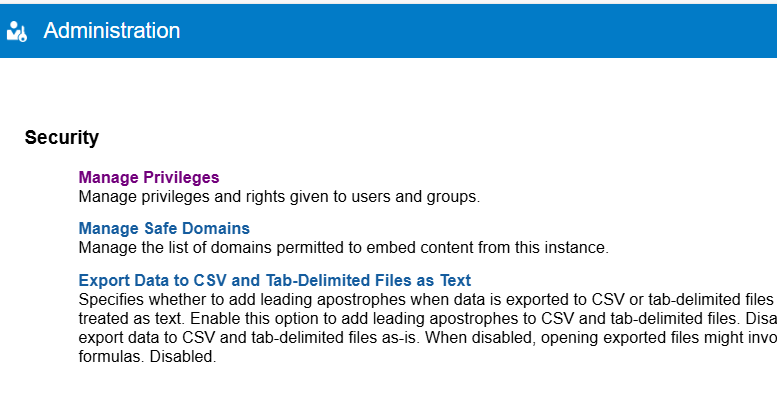
You might need to look at Administration → Security → Manage Privileges and see if it is possible to remove the gear icon and other access options. Please refer the below scree shot…
0 -
We are able to do this using URL for OTBI Report, but for BIP Report it is not working.
OTBI Actual Link -
https://instance.com/analytics/saw.dll?Portal&PortalPath=%2Fshared%2FCustom%2FVSA%2FReport%2FDashboard%2FIncentive%20Compensation%20Invoice%20Report
OTBI Updated Link - (working)
https://instance.com/crmUI/BIProxy?cid=BIDB_Connection&RedirectURL=saw.dll%3FSyndicatePages%26Syndicate%3Dadf%26PortalPath=%2Fshared%2FCustom%2FVSA%2FReport%2FDashboard%2FIncentive%20Compensation%20Invoice%20Report
BIP Actual Link -
https://instance.com/analytics/saw.dll?bipublisherEntry&Action=open&itemType=.xdo&bipPath=%2FCustom%2FVSA%2FReport%2FDashboard%2FAnalysis%2FRank%20Based%20on%20attainment%20Percentage.xdo&path=%2Fshared%2FCustom%2FVSA%2FReport%2FDashboard%2FAnalysis%2FRank%20Based%20on%20attainment%20Percentage.xdo
0