Oracle Analytics

Welcome to the Oracle Analytics Community: Please complete your User Profile and upload your Profile Picture

CASE Statement Not Evaluating with Level-Based Hierarchy in OAC

Received Response
22
Views
2
Comments
PeteSiekierski
PeteSiekierski Rank 3 - Community Apprentice

I want to change the behavior of certain columns in my OAC analysis that uses a ragged level-based hierarchy. What I've found, though, is that the value of a column in the hierarchy does not seem to be available consistently - or even at all - when I use it in a CASE statement.

In my situation, my accounting hierarchy has 15 levels, and when I get down to level 9, one of the parent accounts is revenue, represented by the value "REV". However, when I put the value of "Parent Account 9" into a CASE statement to do something as simple as choosing between two numeric values, I get nothing back - even when I include an ELSE clause as a catch-all.

parent_acct9.jpg

As you can see in the example above, Parent Account 9 is "REV" (revenue) or "EXP" (expenses) when I get far enough down in my hierarchy. Notice that the column is NULL for the other rows; this is because they are at levels 8 or above in the hierarchy. The children of REV and EXP all display one of those two values in the column when I expand the node. This seems perfectly normal.

The M1 Switch column - a simple CASE statement involving the value of Parent Account 9 - evaluates to NULL in all cases, though, regardless of whether the value is "EXP", "REV", or NULL.

I would expect something - a zero or a one - but instead I get nothing. OAC doesn't give me any warnings or errors about my formula syntax; nonetheless, it is definitely not working the way I think it should.

Is there perhaps a practical workaround or trick of the syntax that I've missed?

Answers

  • PeteSiekierski
    PeteSiekierski Rank 3 - Community Apprentice

    Ultimately, here is my dilemma: is there a way to use my level-based hierarchy setup to show numbers with the correct sign consistently?

    By convention, both revenue and expenses are displayed as positive numbers. Typically, however, revenue is a large credit (negative) balance in the GL, while expenses are a large debit (negative) balance. The difference of the two is pre-tax income and, when combined with income taxes, makes the net income.

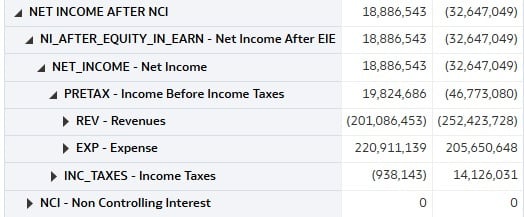
    In the screenshot below, I've demonstrated the raw accounting numbers using my level-based hierarchy after having removed all CASE statements that attempt to make amounts positive or negative. This makes the signs on the numbers consistent, but in some cases, the opposite of expected convention.

    net_income.jpg

    The first column shows an unusual situation where, for a given period, expenses exceeded revenue, leaving a $19.8M debit balance pre-tax. The second column shows the normal situation in a prior period where revenue exceeded expenses, leaving the company with a $46.7M pre-tax credit balance for the month.

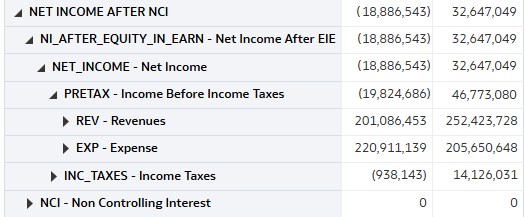
    Ideally, what this analysis would show is positive revenue numbers both months, but negative totals for pre-tax, net income, net income after equity, and net income after NCI in the first column. Conversely, those same values would be positive in the second column where the revenue exceeded the expenses for the month… like this:

    image.png

    How could I go about creating a display value that I could show at certain places in the hierarchy to achieve an effect like the one shown in the second screenshot?

  • Sushant Mishra
    Sushant Mishra Rank 6 - Analytics & AI Lead

    If the value depends on hierarchy navigation (parent/ancestor columns),
    do NOT reference the “Parent Account N” display column in a formula.


    Instead, compute the ancestor using hierarchy functions.

    The workaround that usually works is to use HIERARCHY_ANCESTOR(...)
    to fetch the level-9 ancestor from the hierarchy in a way the SQL engine
    can actually evaluate.

    Instead of:

    CASE "Dim - Acct Hierarchy"."Parent Account 9"
    WHEN 'REV' THEN 0
    ELSE 1
    END

    Use:

    CASE
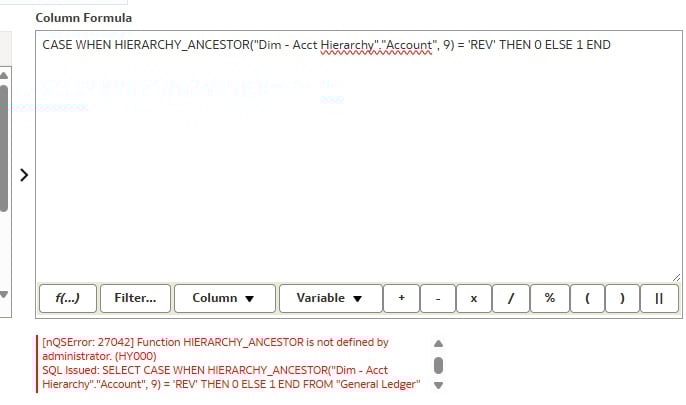
    WHEN HIERARCHY_ANCESTOR("Dim - Acct Hierarchy"."Account", 9) = 'REV' THEN 0
    ELSE 1
    END

    If the function returns a description try using UPPER(TRIM(...)).

    Hope this helps.