Oracle Analytics

Welcome to the Oracle Analytics Community: Please complete your User Profile and upload your Profile Picture

OAS Classic Subject Area and DV Dataset calcs use floating point (DOUBLE)

Received Response
22
Views
3
Comments
Tim Dickinson UK
Tim Dickinson UK Rank 3 - Community Apprentice

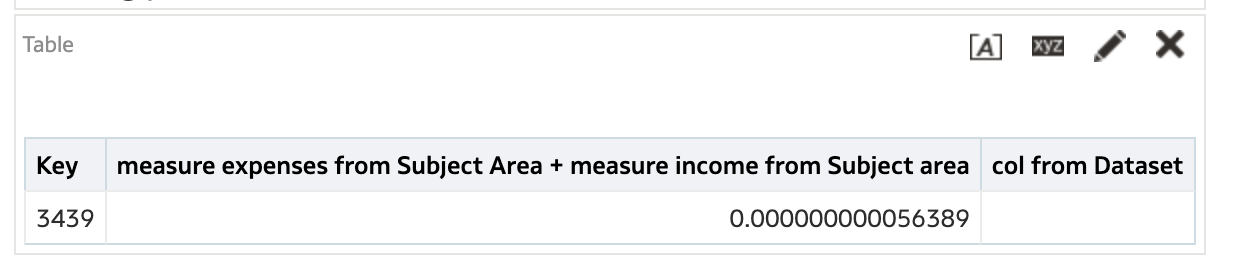
This behaviour may be expected in OAS but it is a bit frustrating when trying to filter out 0. Basically Combine a Subject Area with a Dataset by joining in DV workbook, go into Classic and create an analysis. Example Expenses = 100 and income = -100 from subject area, but, creating a calculation on the subject area measures only it appears to force OAS to use double arithmetic and then we can't just simply filter out 0 as the total is not true 0. We have to do abs and coalesce etc on the amount in a filter to get it to true 0. See Screenshot with a calculation that has this exact issue. Is this just expected. It seems a bit of a unpleasing workaround?

Tagged:

Answers

  • Chere-Oracle
    Chere-Oracle Rank 6 - Analytics & AI Lead

    Hi Tim,

    I am guessing that Expenses or Income, or both, is not an Integer, so one or both of the values is not truly 100. My suggestion is to convert them to Integer data type for your calculation, like this:

    CAST(Expenses AS Integer) + CAST(Income AS Integer)

    Otherwise, you can change the calculation to round the sum, like this:

    ROUND(Expenses + Income, 0)

  • I believe it is documented here

    You can't represent some numbers exactly with binary floating point data types such as FLOAT and DOUBLE.

    When converting decimal numbers to and from binary floating point representations, often there are rounding errors because of the representational limitations of binary floating point formats. For example, a decimal number such as 1.365 might be represented as 1.364999999999999 when converted to the DOUBLE type. When this number is rounded to 3 digits after the decimal point, the result is 1.365. However, if the number is rounded to 2 decimal digits, then the result is 1.36 and not 1.37.

    To avoid the limitations of the FLOAT and DOUBLE types, Oracle suggests that you update the FLOAT and DOUBLE data types to the NUMERIC type. There is no workaround to fix the inherent limitations with binary floating point data types, other than switching to the NUMERIC data type.

    Hope it helps!

  • Tim Dickinson UK
    Tim Dickinson UK Rank 3 - Community Apprentice

    Thanks @Chere-Oracle and @RVohra for your responses. Certainly @Chere-Oracle casting to INT and then setting filter <> 0 works ok. But the reason for the question is more the mechanics of why BI server appears to force the double floating point type for RPD columns that are 100% number in the RPD, simply because there is a dataset joined to the Subject area in a workbook which is then used to write a combined classic analysis of the Subject area and Dataset. If you don't include the DV dataset in the analysis you don't get this behaviour. I could perhaps understand it if an attributized measure actually came from the joined Dataset, but in the example given expense and income do not and are RPD subject area columns. It means that if you are extending a subject area by joining a dataset say to get some other attribute info thats not in the subject area then you get these minute differences as BI server seems to have somehow in memory changed the datatype to floating point without being asked! is there a way to force the calculation in the database?


