Dear Team,
Could you please advice
How to restrict Custom dashboard based on role access. Should not show dashboard to any other users login with having dashboard access.
Regards,
Tapas
Hi @Tapas_Sathua ,
Welcome to the Oracle Analytics community and forum.
Every object in the catalog has permissions, and through these permissions you can grant or deny access to it based on the application role or the user directly (better to avoid that and stay on the application role).
You probably already tried that, and therefore your question is maybe a bit different.
Do you mind providing a few more details? What product and version are you asking about? Is the "dashboard" a "classic" dashboard or a DV workbook or something else? What have you tried? Did you look into roles inheritance already? (That could make it looks like your security isn't working.)
Hi @Gianni Ceresa,
I am functional consultant not have idea on report
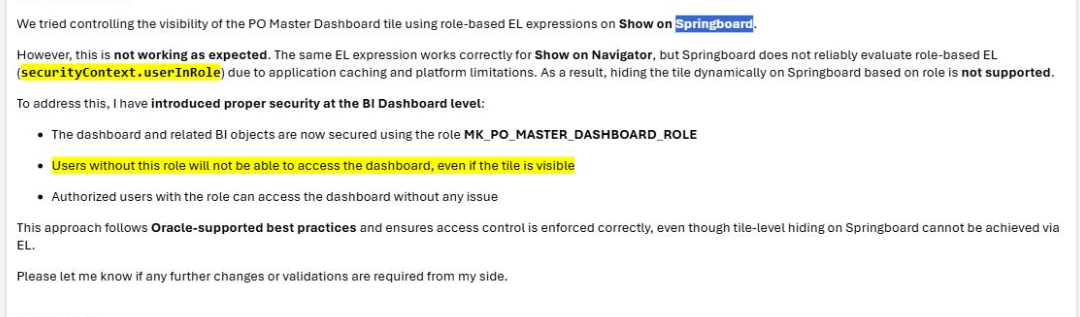
Below is the comments I got
Could you please review & suggest
Regards
What product are you using?
You maybe aren't using an Oracle Analytics product but something else (that will get a better answer by asking in a different forum, but instead of randomly saying "wrong place", I try to be sure of what place is the right one if not this forum).
Explore how to build agents using code in AI Data Platform. We'll create an agent that examines and analyzes the contents of a Github repository and reports its findings. The session demonstrates how to use different developer tools to create agents including the AIDP extension for VS Code and Codex. Using these tools we…
What is wrong with this code
Am I missing something or is there no way to search through previous posts to make sure I don't duplicate a question? All I see on the filter options are tags or status… a general search for a word or phrase would be helpful.
We were under the impression that when exporting a visualization in DV to CSV format hidden columns would be include from the grammar panel. This is not happening. See below for a screenshot showing 3 hidden columns that do not appear when exporting the pivot table to CSV. This seems to have worked a month or so back but…
Migrated RPD from obiee12c to OAS 2024. post migration when we try to access dashboards on OAS we are getting below error: State: HY000. Code: 10058. [NQODBC] [SQL_STATE: HY000] [nQSError: 10058] A general error has occurred. (HY000) State: HY000. Code: 43275. [nQSError: 43275] Message returned from OBIS…
There is no option for legend title in many visualization types.