Does anyone know if there's a way to refresh a Repository variable on demand? There is an option to define the refresh frequency, but I couldn't find a way to refresh it manually.
Hello,
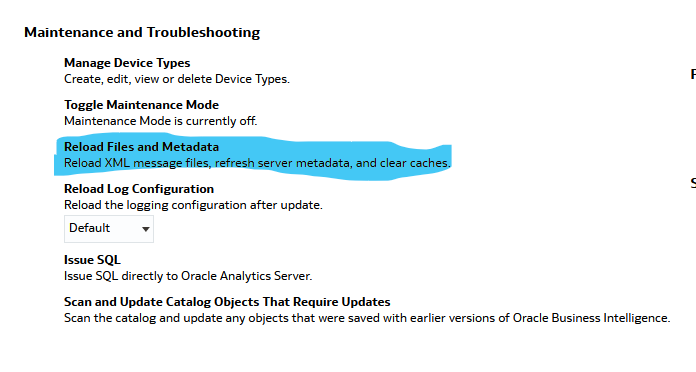
In Oracle Analytics Cloud (OAC), the "Reload Files and Metadata" action is the standard administrative operation used to refresh the RPD (repository) in online mode and applies any changes, including updates to repository variables.
https://docs.oracle.com/en/cloud/paas/analytics-cloud/acabi/classic-administration-page.html
@DeepaliG-Oracle , I do not think we can refresh it manually.
If it is a static repository variable, it's value is initialized in the Variable dialog.
The value of the static repository variable persists and doesn't change until an administrator decides to change it. For example, suppose you want to create an expression to group times of day into different day segments. If Prime Time were one of those segments and corresponded to the hours between 5:00 PM and 10:00 PM, you could create a CASE statement like the following:
CASE
CASE WHEN "Hour" >= 17 AND "Hour" < 23 THEN 'Prime Time' WHEN... ELSE...END
If it is a dynamic repository variable, it can be initialized in the same way as static variables, but the values are refreshed by data returned from queries.
When defining a dynamic repository variable, you create an initialization block or use a preexisting one that contains a SQL query. You also set up a schedule that the Oracle BI Server uses to run the query and periodically refresh the value of the variable. When the value of a dynamic repository variable changes, all cache entries associated with a business model that reference the value of that variable are purged automatically.
Each query can refresh several variables, one variable for each column in the query. In Oracle BI Server, create a schedule to run the queries.
Please refer this doc for more details. Hope it helps!
Thanks @Henry Cabrera @SteveF-Oracle @RVohra, for your answers. Let me review and analyze what fits for our use case.
@DeepaliG-Oracle feel free to share your analysis here. It will help community in long run. Thanks
There is no native “Refresh Now” button for Repository Variables in Oracle Analytics.
Repository variables (especially dynamic ones) are refreshed only through:
They are evaluated and stored at the BI Server level, not at the dashboard/runtime layer. So dashboards, prompts, and analyses have zero control over forcing a refresh.
Use these options given below
If you truly need on-demand refresh logic, session variables are much more flexible.
Why?
This is usually the recommended design if the value must reflect near real-time logic.
In the init block settings, you can:
But downside:
If my response has answered your question, please mention the thread as Accepted Answer as this will help the community members on the solution
Description: Join our Product Management team to learn about new features that are part of 26.R3 Application release of Fusion Data Intelligence (SCM). The session will cover updates on Supply Chain Management and Procurement. Presented by: Anil Sebastian - Senior Director, SCM Product Management, Fusion Data Intelligence…
Good day, please kindly assist. We are creating a graph to calculate the number of assets per milestones. However, the planners have only populated assets for only one milestone from the list of milestones the customer wants to track. Which gives an incorrect view as the project moves past different milestones that it has…
I scheduled the report in OTBI and the agent was run successfully. However, I do not receive the report after the run in my inbox. The addresses are properly recorded, and the report is in an excel format and saved as a pivot table in otbi. What can be the cause?
Anyone has any idea why the OAC documentation on custom viz is not available now? I was able to access till last week - https://docs.oracle.com/en/cloud/paas/analytics-cloud/acsdv/build-package-extension.html. Does this mean OAC doesnt support custom viz or custom workbook extensions?
I made a parameter with letter range values… put it into a dashboard filter. Then I created an expression filter to bind it to my last name column in the table with the image I uploaded here. I am getting the following error??? Invalid Expression. Validation of parameter values failed. A general error has occurred. Message…
Does Oracle Analytics Server 2026 include AI features such as a built-in chatbot or AI Assistant? If not, are there any plans or indications that these AI capabilities will be introduced in a future OAS release?