Hi experts,
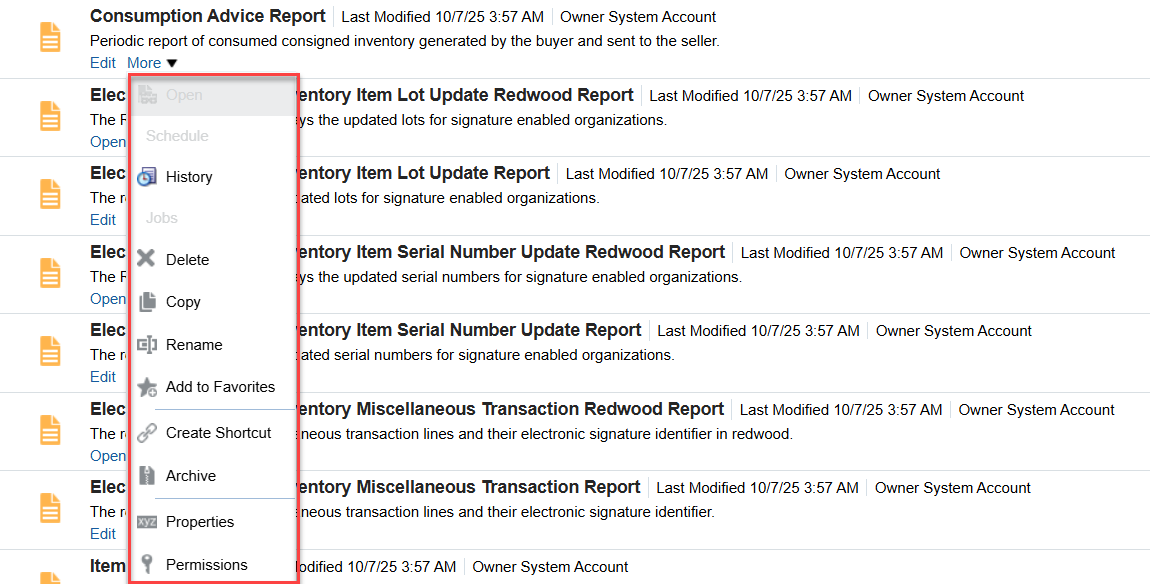
i am trying to open/view the report from OTBI, but the open field is greyed out and when i try to edit and click on view report to open it - nothing is happening. i have all the roles. Please help me out
Thanks,
Srikar
Hello Srikar, These reports are most likely invoked from the application. If you edit one of them and click on Properties button, you can check the "Run Report Online " checkbox and it will make the Open option available in the Catalog.
Thanks Hassan
Hi @Srikar Pusuluri,
Welcome to the Oracle Analytics Community!
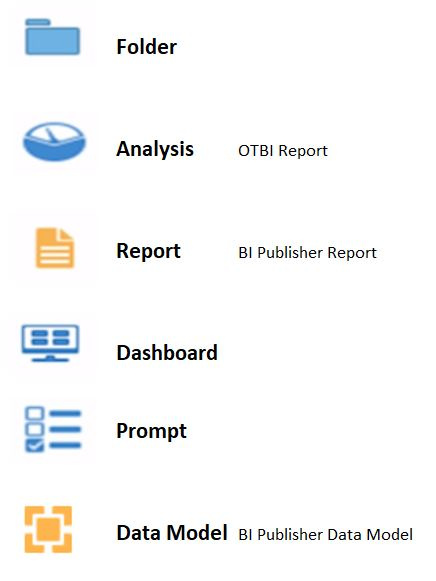
It seems the reports that you highlighted in the above screenshots are BI Publisher Report.
If there is an open button then you can click and the report will open and ask for the parameters to pass if it is parameter enabled but if you don't see the open button then those are called from an ess jobs or scheduled reports.
Hope this help.
Thank you.
Here's an image describing all different icons and their meanings which might be useful for better understanding.
@Srikar Pusuluri , Welcome to the Oracle Analytics Community! These reports are located under Shared Folders/Supply Chain Management / Warehouse Operations/ Inventory. Please confirm.
@Srikar Pusuluri , I just confirmed these indeed belong to Inventory and as far as the Consumption Advice Report is concerned, it basically used in the scheduled process. It is used to create consumption advices from consigned inventory-related transactions.
When to Use
A consumption advice is a periodic summary report of consumption transactions that reports the usage of consigned inventory to the supplier based on a consumption advice frequency.
The consumption advice stores the details needed to communicate information to the supplier such as item quantity and value of the inventory consumed in the warehouse. The consumption advice also serves as the document to initiate financial settlement for the consumed material.
More details about privileges required and parameters to use this report can be found in this oracle doc.
Please feel free to reach out if you have any further questions on this topic. Thanks
Explore how to build agents using code in AI Data Platform. We'll create an agent that examines and analyzes the contents of a Github repository and reports its findings. The session demonstrates how to use different developer tools to create agents including the AIDP extension for VS Code and Codex. Using these tools we…
Our Requisition OTBI analysis is having many values Requisition Number Requisition Title Requisition Status Hiring Manager Full Name Recruiter Full Name am able to see values for all. When am passing Prompt(Hiring Manager Full Name or Recruiter Full Name) am not able to see the data. Am sure we have values/data for passed…
Hi Experts, We are using Oracle BI Publisher Email Bursting to distribute reports via email. Currently, one of our bursting outputs generates a report of approximately 20 MB, and we are trying to understand whether there are any size limitations that could impact email delivery. Scenario: Report Delivery Method: Email…
Team, We have a requirement to select below PVOs HcmTopModelAnalyticsGlobalAM.ProfileAM_ProfileItemPVO HcmTopModelAnalyticsGlobalAM.ProfileAM_ProfilePVO HcmTopModelAnalyticsGlobalAM.ProfileAM_ContentItemPVO HcmTopModelAnalyticsGlobalAM.ProfileAM_ContentTypePVO Do we have any documentation around these?
We have a requirement of enabling OTBI report in Purchase Requisition Redwood page similar to classic UI.How can that be done?