Categories
- All Categories
- Oracle Analytics and AI Learning Hub
- 43 Oracle Analytics and AI Sharing Center
- 19 Oracle Analytics and AI Lounge
- 281 Oracle Analytics and AI News
- 57 Oracle Analytics and AI Videos
- 16.2K Oracle Analytics and AI Forums
- 6.4K Oracle Analytics and AI Labs
- Oracle Analytics and AI User Groups
- 105 Oracle Analytics and AI Trainings
- 20 Oracle Analytics and AI Challenge
- Find Partners
- For Partners
Language Narrative - 'Analysis' Type Change - Not loading the narrative back, after a Query Error
Here is the sequence of steps that unearthed the issue:
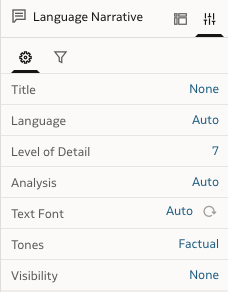
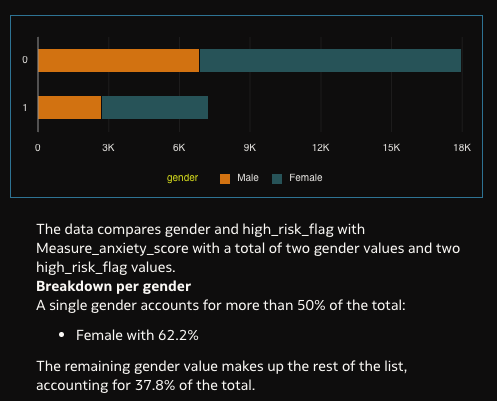
- Visualisation duplicated to load the 'Language Narrative' description. Right now, the 'Analysis' is set to the default 'Auto'.
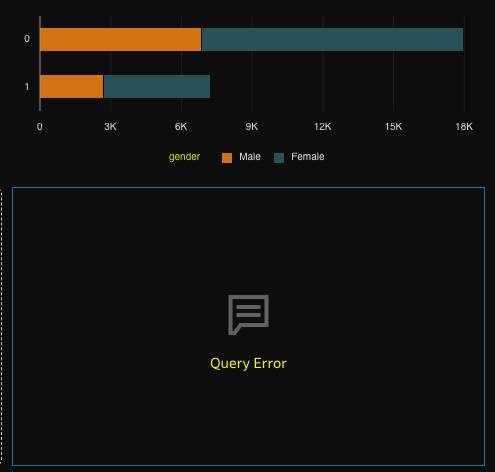
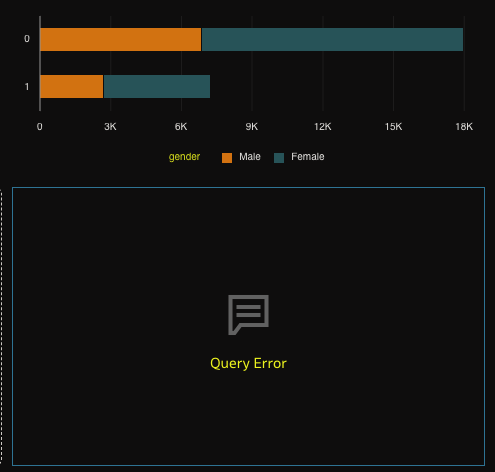
2. Analysis now is now manually changed to 'Trend', which leads to a 'Query Error'. Note that 'Breakdown' option worked fine in this scenario.
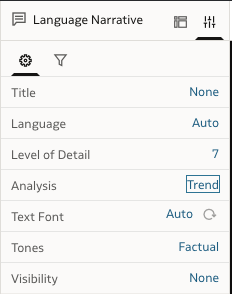
What can be better / improved, for better customer experience?
- When a Query Error is resulted, even after reverting back the Analysis option to 'Auto' or 'Breakdown', which worked earlier; the narrative is not loading back in the visualisation.
- Provision to get details of the 'Query Error' or information on what is causing the issue.
Comments
-
Hi Ambili,
For Trend i beleive that you need a time dimension but i will verify. Can you try replacing with a time dimension and check please?
Can you share a screenshot of the UI error?
Thanks.
1 -
Hi Avinash,
Yes, you are right. For the trend, we do need a time dimension and it does work when we add it.
My observation and recommendation here was that - in case an error is hit, a change in the Analysis option in properties is not refreshing the visualisation, loading the narratives back.
The UI error is as below, wherein it just mentions 'Query Error'. But no details of it are further visible. That is why this was included as my second suggestion.
0