Oracle Analytics Forum

Welcome to the Oracle Analytics Community: Please complete your User Profile and upload your Profile Picture

Adding Additional Sources to Logical Table - Can't See Additional Source Data in Subject Area

Accepted answer
55
Views
8
Comments
Erik AE
Erik AE Rank 2 - Community Beginner
edited Feb 10, 2025 5:17AM in Oracle Analytics Forum

Hi.
I am creating a Semantic Model in OAC & I want to add an additional Source (Table B) to an existing logical table (Logitcal Table A). Table A & Table B are the exact same table structure. However, after I add table B as an additional Source in the Logical Layer to Logical Table A, check for errors & deploy, the subject area only shows data for table A BUT not B. Mapping is correct. I've read through the Oracle Doc.Building Semantic Models in Oracle Analytics Cloud
. Table B certainly has data. Both tables are enabled in the Sources tab. Both have Priority 0. Both Table A & B are joined to a Calendar table at the Physical Layer & those are the only 3 tables used so far.
New to this. We don't have the option for an ETL to union both tables. Any suggestions on what I could check?

Best Answer

  • Hi @Erik AE ,

    This is the expected behavior. By default, different logical table sources for the same logical table are not combined together.

    You have 2 options to do the union:

    • If you are using the Model Administration tool to create and manage the RPD, you have to tick the "This source should be combined with other sources at this level" option in the Content tab of each logical table source that you want to combine. There should be something similar in the Semantic Modeler as well.
    • Otherwise, you could combine the tables directly in the physical layer by defining an opaque view, or in the database by defining a view and importing it in your Semantic Model.

Answers

  • In addition to what Federico said, if your 2 tables do not contains exactly the same data, you don't want to always query both tables. If you have a known rule defining what is in table A and what is in table B, you can define the fragmentation rule. In this way, if a filter is set in the front-end for that same criteria, the physical query will not go to both tables but only to the one with the data. It can help improve your performance. But as said, it only work if you have a known rule defining the data contained in A vs B.

  • User_6WR9W
    User_6WR9W Rank 2 - Community Beginner

    Hi
    I encountered the same problem as Erik. The table structure is also the same, the priority group is 0, and the mapping is correct. I'm using the first option suggested by Federico, and despite checking the "This source should be combined with other sources at this level" option when creating an analysis, I always receive data from either the first or second source table, never both (the union doesn't work). I have no fragmentation rule. Do you know what might be causing this?

  • Hi @User_6WR9W ,
    Welcome to the Analytics and AI community (even if it isn't your first visit).

    The behaviour of the BI Server in generating queries based on a semantic model is highly predictable.

    A "UNION" isn't the most natural kind of query generated from any model, most of the time there is some kind of condition defining what comes from source A and what from source B, and that become the fragmentation rule.

    What is your situation like? Do you always need a UNION? Do both tables come from the same connection pool?

    What product are you using?

  • User_6WR9W
    User_6WR9W Rank 2 - Community Beginner

    Hi @Gianni Ceresa

    Thank you for your reply. I'm aware that UNION isn't the most natural approach here, but we have two tables from two different databases (so they're from two different connection pools). We don't want to do ETL to export the table from one database to another, so the most convenient solution seems to be to unionize them in the repository.

    I'm using the BI Administration Tool.

  • Gianni Ceresa
    edited Feb 10, 2026 3:25PM

    Ok, you are using OAC, right? (if OAS, what version?)
    Is this table used as dimension or facts?

    Just to give it a try with something being as close as your case as possible.

    The "annoying" part is that it comes from different databases, therefore the BI Server will need to do all the job. I hope it isn't too much data, or you will feel it (very very slow).

  • User_6WR9W
    User_6WR9W Rank 2 - Community Beginner

    I'm using OAC, and the problematic logical table is a fact table. Yes, retrieving tables from two different databases is definitely not the most efficient, but fortunately, these tables aren't large (640 and 1200 records).

  • I did just a quick test with OAS 2025 (I don't have an OAC I can freely change the semantic model) to be as close to the current logic.

    I also only tested with 2 tables from the same database to not have to create a new account (will do that if you report it still not doing a UNION ALL).

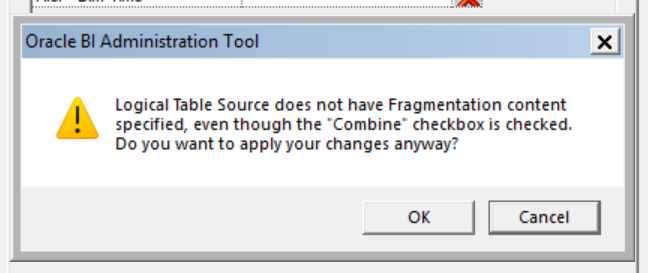
    In your 2 logical table sources (LTS), you need to check the "This source should be combined with other sources at this level" checkbox, but just that doesn't change anything and you get a message that you don't have a fragmentation rule.

    If you really can't define a real fragmentation rule to differentiate content from table A and table B, you can fake it.

    Add a new logical column in the logical table, in the column mapping you set a static value, for example 'A' for the first LTS, and 'B' for the second LTS. Then in each LTS you can define the "Fragmentation content" expression to be "your model"."your logical table"."your fake column" IN ('A') in the first LTS, and "your model"."your logical table"."your fake column" IN ('B') in the second LTS.

    That's enough to tell the BI Server that if no condition is set on the fake column, it should union the result of both queries.

    No need to expose that fake column in a subject area, just the existence should be enough to trick the BI Server in thinking it does matter.

    Give it a try, and look closely at your logs when the query is generated to see what happen behind the scenes.