Categories
- All Categories
- Oracle Analytics and AI Learning Hub
- 53 Oracle Analytics and AI Sharing Center
- 25 Oracle Analytics and AI Lounge
- 306 Oracle Analytics and AI News
- 57 Oracle Analytics and AI Videos
- 16.4K Oracle Analytics and AI Forums
- 6.6K Oracle Analytics and AI Labs
- Oracle Analytics and AI User Groups
- 117 Oracle Analytics and AI Trainings
- 22 Oracle Analytics and AI Challenge
- Find Partners
- For Partners
Urgent Request! - Oracle Analytics AI Assistant Embedding is down automatically
Hello OAC Community .We observed today (26-Feb-2026) our embedded AI Assistant is automatically not being displayed on the web page .This was working fine from last couple of weeks .On the console we're seeing the errors as shown in below screenshot :
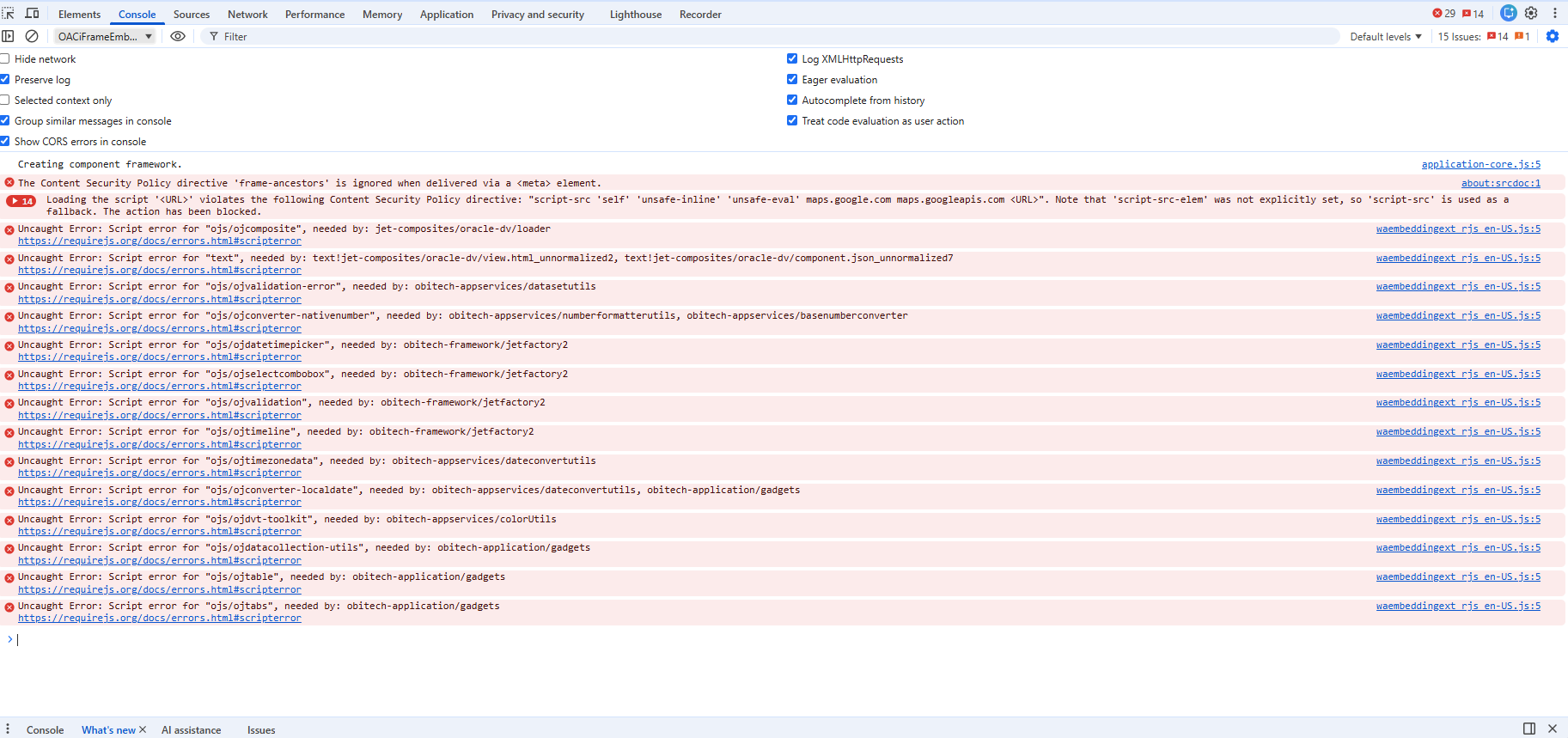
The embedding page was prepared as per the below OAC documentation (With Tokens approach) :
Prepare the HTML Page for Embedding the Oracle Analytics AI Assistant
pls advise how to resolve this issue…
Thank you.
Answers
-
Please could you log an SR with Support. Thanks.
0 -
@Hasan Sd , Hopefully, you have already SR logged with Oracle Support to help you. In the meantime, please note you must register the domain where your content will be embedded as a “Safe Domain” in Oracle Analytics Console before embedding will work, this drives the CSP settings that allow the
<iframe>to load without browser blocking.Here are the details on registering an Application as a Safe Domain.
Before you can embed Oracle Analytics content into another application, your administrator must register the application's domain as safe.
For security reasons, you’re not allowed to add analytics content to an applications unless your administrator considers it safe to do so.
Web browsers have become more restrictive about dealing with third party cookies. This restriction can impact embedding projects where the browser won't display your embedded analytics content.
To work around this issue you can use a vanity URL for the Oracle Analytics instance so that it appears to be on the same domain as the domain where you're embedding analytics content. See Set Up a Custom Vanity URL.
Use this information if you're using JavaScript to embed analytics content:
- Due to CORS safeguarding, you can't open your HTML file containing embedded analytics content directly in a browser. To work around this issue you must register the web server (either localhost or another web server) as a safe domain.
- If you use a localhost web server for testing, then you may need to add references to http://localhost:<port> and http://127.0.0.1:<port>.
You must be an administrator to perform this task.
- Go to Oracle Analytics, click Navigator, and click Console.
- Click Safe Domains.
- Click Add Domain and enter the domain.
- Select Embedding.
- If using compatibility mode with embedding, select Allow Frames.
Hope it helps!
0 -
Please also test checking the style option in safe domains.
Thanks
Mike
0