Categories
- All Categories
- Oracle Analytics and AI Learning Hub
- 53 Oracle Analytics and AI Sharing Center
- 20 Oracle Analytics and AI Lounge
- 293 Oracle Analytics and AI News
- 57 Oracle Analytics and AI Videos
- 16.4K Oracle Analytics and AI Forums
- 6.5K Oracle Analytics and AI Labs
- Oracle Analytics and AI User Groups
- 116 Oracle Analytics and AI Trainings
- 21 Oracle Analytics and AI Challenge
- Find Partners
- For Partners
OAC Conditional formatting stops working for some Consumer Roles or Users
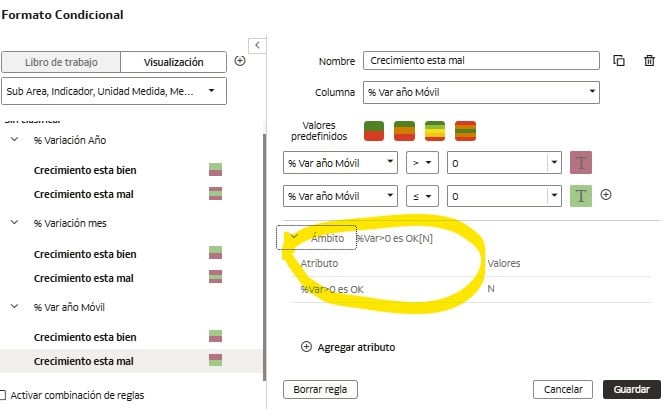
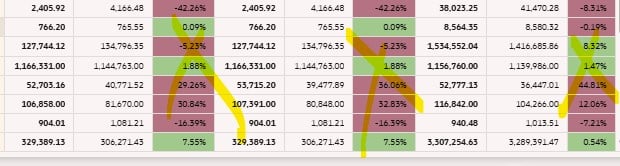
Recently a user told me they couldn't see any conditional formatting in your dashboard (Table Objet), but when I log in, it works perfectly.
I created a new user account for test, I shared the report with the same role and the formatting was visible OK, but after a few hours it stopped working again!
Older versions of the same report work fine for that user, but the newest one doesn't. (There are no differences in the table display properties or presentation options).
I think it might be a role-related problem, but I can't find a solution.
Best Answer
-
I shared the report with the same role and the formatting was visible OK, but after a few hours it stopped working again!
You should file a Service Request for this, if you have not already.
0
Answers
-
Hi,
Is your dashboard a "classic" dashboard page with an analysis in it? Or is it a DV workbook? (I'm not fully sure, the border on the table make me guess "classic", but it could also be DV).You said the older version of the same report work: what is the difference between the two versions?
The fact it does work first and then stop working, make me guess it isn't related to application roles, because the security is quite binary: it's either TRUE/1 or FALSE/0, it isn't something that can be evaluated one time to YES and another time to NO.
0 -
Thanks for replying! It's a DV workbook, previous versions didn't use SQL-based parameters and had less complex calculations and fewer content tabs, but the table with the problem is the same.
Conditional formatting uses "Scope," which makes it a bit more complicated, but it's been working for the last four years.0 -
Thanks!! yes I already asked my boss to initiate a SR. I temporarily resolved the situation by changing the user profile from User Consumer Business User and then managing the corresponding permissions, limiting the role to read-only.
1