
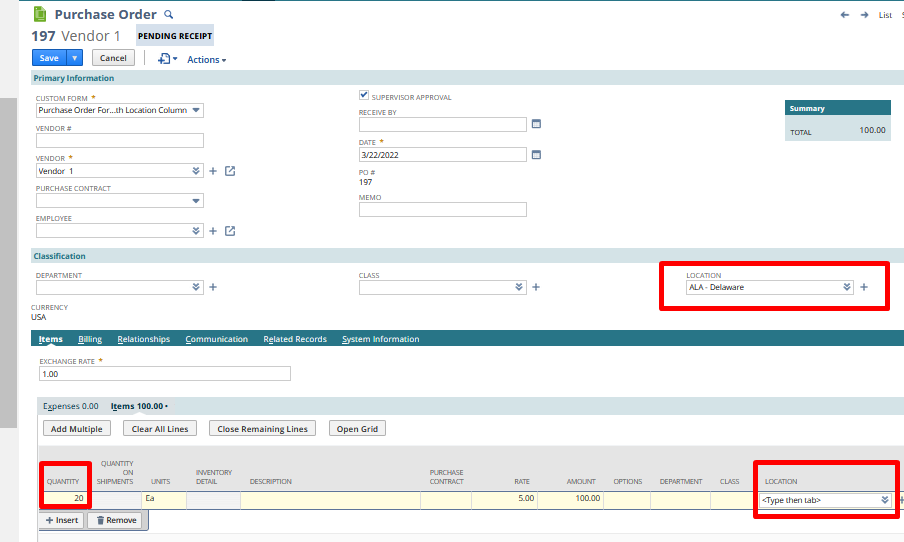
Scenario: Users may notice that the On Order Quantity in the Item Record is not updating or incorrect. This happens when the Location (main line) is set in the Purchase Order, and the Location (transaction line) is not.
Note that this is true when the Location column in the Purchase Order form is exposed.

Solution
This behavior is encountered since Item Line Location takes precedence over the Location in the Main line of the transaction record.
I. To resolve,
A.) Customize the form and retrigger the Purchase Order. You can follow the steps in SuiteAnswer Id 86870,
1.) Edit the Purchase Order that does not reflect the Quantity On Order
2.) Go to Customize (upper right of page) > Customize Form > Sublist Fields subtab
3.) Search for Location field and set 'Show' = F
4.) Click on Save
5.) Edit the same Purchase Order
6.) Set Location (main line) = blank
7.) Click on Save
8.) Edit the Purchase Order
9.) Location (main line) = Set preferred location
10.) Click on Save or;
B.) Set the Location in the Item Line
1.) Open the Purchase Order in Edit mode
2.) Set the correct Location in the Location column/Item Line
3.) Click on Save
II. To avoid this in future transactions, users may opt to Make Locations Mandatory
In Setup > Accounting > Acccounting Preferences > General > Classifications, check the box for MAKE LOCATIONS MANDATORY to make the Location field required on records and transactions.
If you check this box, records and transactions cannot be saved without completing this field, thus, would help avoid this scenario.
Hope this helps!
