
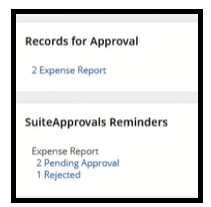
The Records for Approval Portlet gives you an easy and quick access to the Purchase Orders, Vendor Bills and Expense Reports that needs your approval.
The SuiteApprovals Reminders Portlet will provide the list of records that are awaiting approval, needs view for re-approval, and those that were rejected.
Set it up by following these steps --

- On the Homepage, click on Personalize
- On the Personalize Dashboard > Click on SuiteApps
- Add the portlets by clicking SuiteApprovals | Records for Approval, SuiteApprovals | Pending and Rejected Records
Once set up, it will look like this:
Hope this helped!
