ディスカッション
AIを用いた自動化で請求書処理を合理化
AIを用いた考察を使用して、計画と予測を迅速化
Join us for complimentary one-day events around the world and step into a future fueled by AI and limitless potential. Explore new breakthroughs, sharpen your skills, and connect with experts who are shaping what’s next. Experience bold keynotes, interactive learning, and connections that span the global NetSuite community. Discover what's next at SuiteConnect Tour 2026.
We’re excited to announce that the 2025 Community Recap is now available! This special recap highlights the amazing contributions and achievements of our members over the year and celebrates the collective success of our community.
Check your personalized recap to see the impact you made in 2025 and how your efforts helped shape our community’s growth and success.
View Your 2025 Community Recap
Thank you to everyone for your passion, collaboration, and support. Here’s to building an even stronger community together in the year ahead!
Season’s greetings to you and yours! As we head into the holidays (December 24 – January 4), we want to take a moment to celebrate the incredible strength and collaboration within our community. Even during the break, you can continue to benefit from connecting with peers, searching related threads, posting your questions, and marking helpful replies as “Accepted” in the Support Community.
Please note our dedicated team will be on reduced coverage during this time, and regular responsiveness will resume on January 5. Wishing you a joyful and restful holiday season!
-The NetSuite Support Community Team
NetSuite の始め方 | Planning and Budgeting Financialsモジュールでのアカウント・メタデータのインポート
NetSuite Planning and Budgetingアプリケーションで財務モジュールを有効にすると、損益計算書および貸借対照表の上位レベル・メンバーを含む即時利用可能な勘定科目メタデータ階層が作成されます。これらの勘定科目にはNFS_という接頭辞が付いており、NSP_NFSキューブに対して有効です。
MD_AcctBalShtおよびMD_AcctStmt統合ジョブを実行する場合、これらの上位メンバーをインポートする必要がなくなり、インポート時に除外する必要があります。そうしないと、ジョブによって検証エラーが発生します。
これらの上位メンバーを除外するには:
1.NetSuiteにログインします。
2.NetSuite EPM > Planning and Budgeting >アカウント・メタデータ階層にナビゲートします
3.「編集」をクリックします
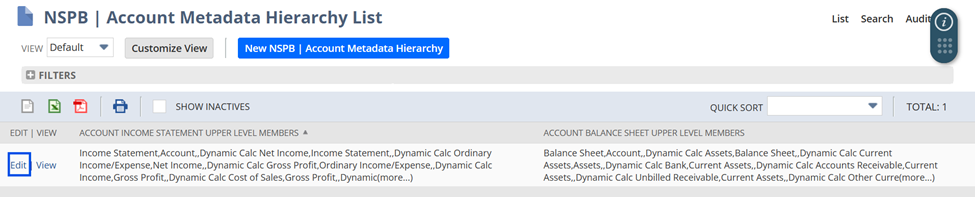
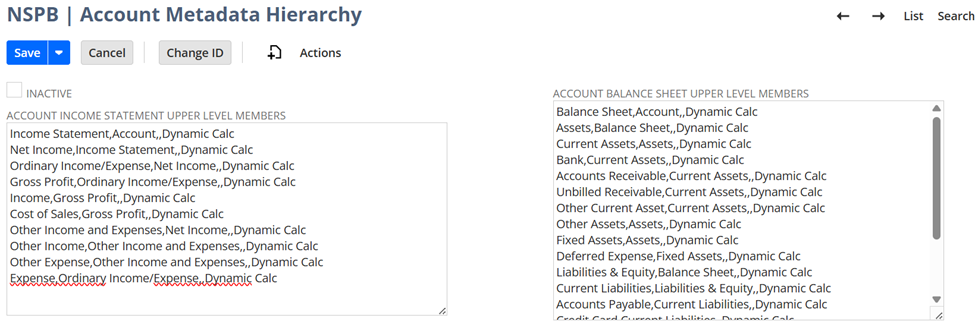
4.勘定科目損益計算書上位レベル・メンバー」および「勘定科目貸借対照表上位レベル・メンバー」の内容をクリアします。
変更前:
変更後:
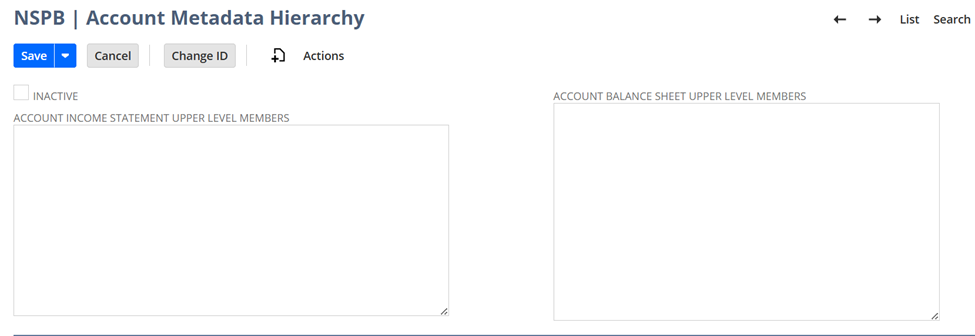
5.「保存」をクリックします
6.保存後、Planning and Budgeting同期SuiteAppでは、アカウント・メタデータ階層の生成にこれらの上位メンバーが含まれなくなります。
または、すべてのアカウント・メタデータ検索に対して除外を実行できます。
1.NetSuiteにログインします。
2.NetSuite EPM →Planning and Budgeting →「保存済検索の管理」にナビゲートします
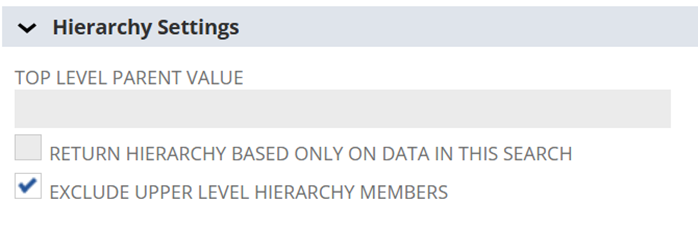
3.アカウント・メタデータ検索(NSPB (メタデータ) FIN損益計算書勘定科目、NSPB (メタデータ) FIN貸借対照表勘定科目)の横にある「カスタマイズ/編集」をクリックします
「上位レベル階層メンバーの除外」
4.フィールドを選択します
5.「保存」をクリックします
「 NetSuite の始め方 > NetSuite Planning and Budgeting (NSPB)」カテゴリをフォローしてください。