Categories
- All Categories
- Oracle Analytics and AI Learning Hub
- 54 Oracle Analytics and AI Sharing Center
- 26 Oracle Analytics and AI Lounge
- 311 Oracle Analytics and AI News
- 57 Oracle Analytics and AI Videos
- 16.4K Oracle Analytics and AI Forums
- 6.7K Oracle Analytics and AI Labs
- Oracle Analytics and AI User Groups
- 117 Oracle Analytics and AI Trainings
- 24 Oracle Analytics and AI Challenge
- Find Partners
- For Partners
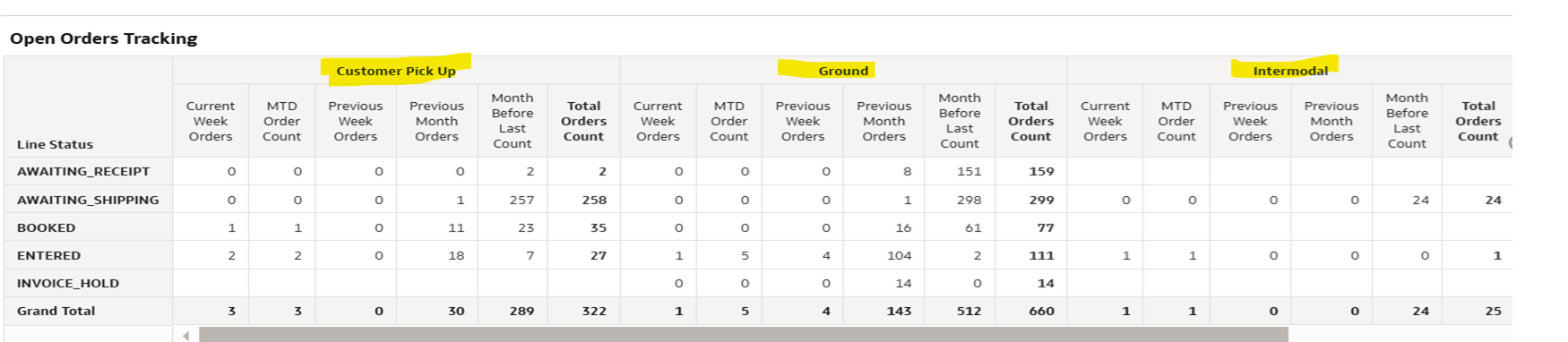
The issue is on the navigation through action link in the workbook trough pivot table .

It is working for the total sum, but I require the mtd, ytd, and qtd measures, and I am unable to acquire the exact results using the various measures utilizing the pivot table in the worksheet when I use the action link to browse through the details page.
Answers
-
When you click on a measure (to open the details page), the measure is picking a column and row intersection — e.g., Line Status = 'AWAITING_SHIPPING' and ??? = 'Ground'. You must take the column formulas for these two columns (i.e., Line Status and ???) and ensure there is a Prompted filter for them both in the detail report.
I am guess that the 18 column headings across the top are actually the names of your measures. You cannot filter the details based on measures. You can, however, call a separate detail report from each measure, each pre-filtered to give the desired span of time.
0
