Categories
- All Categories
- Oracle Analytics and AI Learning Hub
- 53 Oracle Analytics and AI Sharing Center
- 20 Oracle Analytics and AI Lounge
- 293 Oracle Analytics and AI News
- 57 Oracle Analytics and AI Videos
- 16.4K Oracle Analytics and AI Forums
- 6.5K Oracle Analytics and AI Labs
- Oracle Analytics and AI User Groups
- 116 Oracle Analytics and AI Trainings
- 21 Oracle Analytics and AI Challenge
- Find Partners
- For Partners
Dashboard prompt for direct database request
Hey all, I have built a direct database request in OAC and I want to create a dashboard prompt that will allow me to choose values based on data in one of the columns in the direct database request. Is that possible to do? I have been trying to do it using a presentation variable but keep getting failed to load error in the prompt.
Any help, much appreciated
Cheers
GT

Answers
-
Hi @GT86,
Welcome to the Oracle Analytics & AI Community!
QQ: Are you getting issue with the Dashboard Prompt or the direct database query or linking the dashboard prompt into the direct database query?
If possible provide some screenshot (without sensitive data) and explain the issue. It'll be helpful for understanding the issue which will help to find any potential resolution.
Thank you.
0 -
What syntax are you using in the DDR? I have a dashboard prompt producing a presentation variable that this DDR responds to:
1 -
Hello GT86,
Here are two sample conditions that use presentation variables:
nvl(org.ORG_NAME, 'NULL') in (@{TS_Org.isAllColumnValues?NULL:TS_Org}['@']{nvl("ORG"."ORG_NAME", 'NULL')})requests.REQUEST_TYPE in (@{TS_Type.isAllColumnValues?NULL:TS_Type}['@']{"REQUESTS"."REQUEST_TYPE"})There are 4 things you should notice:
- For the variable default, I repeated the table/column (e.g.,
{"REQUESTS"."REQUEST_TYPE"}) instead of using '%'. In your own example, you are actually providing a default value, so you don't need to do this. - If you ever do use a table/column as part of the default, it may not work right unless formatted in all caps with double quotes.
- Instead of a simple name as the variable name (e.g.,
@{TS_Type}), I gave a name and simutaneously instructed the "All Column Values" prompt choice to be passed as a NULL value — i.e.,@{TS_Type.isAllColumnValues?NULL:TS_Type}. This will prevent errors if your prompts allow the "All Column Values" choice. - Notice the
['@']between the variable name and the variable default. If the variable contains a string of prompt choices, the['@']tells the variable to enclose each value in its own single quotes. For example, if Mon, Tues, and Wed are 3 separate values selected in the prompt, the SQL will usein ('Mon', 'Tues', 'Wed')as the condition; otherwise, it would incorrectly usein ('Mon, Tues, Wed').
1 - For the variable default, I repeated the table/column (e.g.,
-
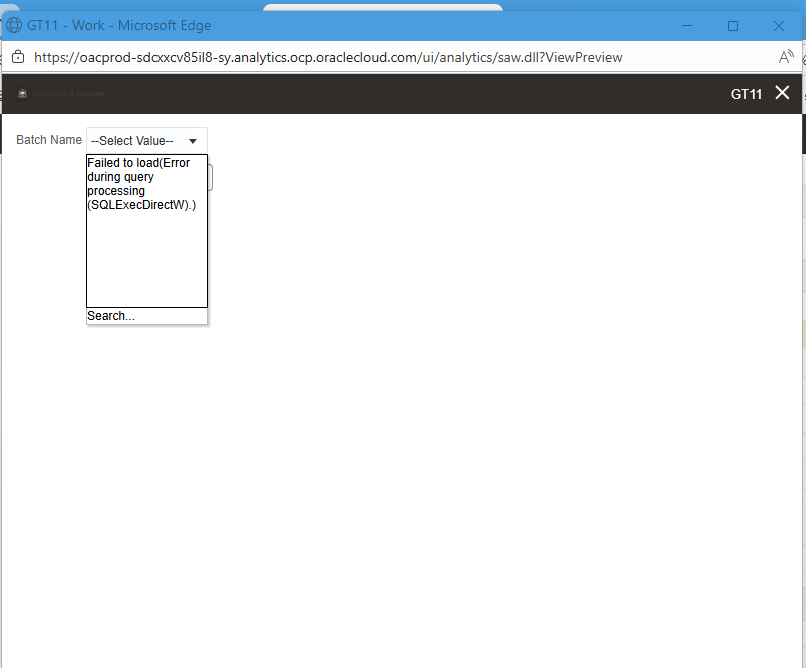
Hi All, thanks for your replies!!. This is the error message I am getting in the dashboard prompt:
0 -
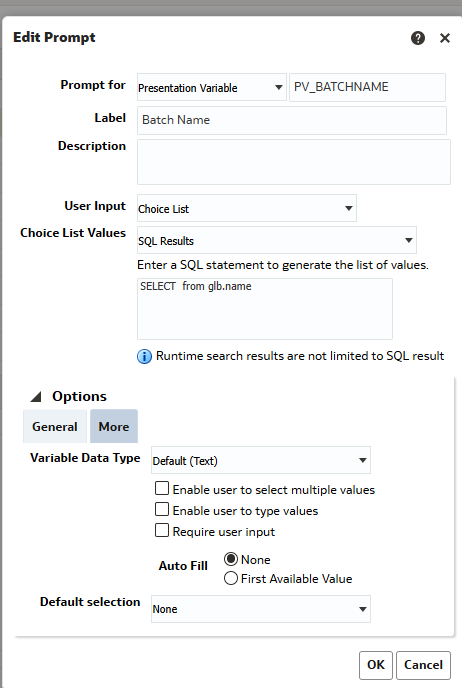
I understand that the SQL statement is wrong in the above screenshot
This is what is in the DDR:
gl_je_batches glb
and glb.name IN ('@{PV_BATCHNAME}{}')
I am sure I have done this in OBIEE/OBI previously but that was many many years ago
Thanks again for your help!!
0 -
Hi GT86,
You cannot do a direct database query within the dashboard prompt. If you use the SQL Results option, it has to be a logical query. Do you have any presentation columns that contain the values that you want to show in your choice list?
0 -
Hey Chere, when you say presentation columns, do you mean columns in a subject area? Sorry for the dumb question, I haven't used analytics for many years :)
Cheers
GT
0 -
Yes, GT86, I mean columns in a subject area. :)
0 -
Yes we do have a column in the subject area, but for some reason this column gets truncated in the subject area. The Batch Name in the ebusiness tables is say 100 characters in the column in the subject area it only shows the first 60 characters. That's why I was trying to use the DDR column in dashboard prompt
0 -
Is the list of values static, or does it frequently change? If static, you can use Specific Column Values instead of SQL Results.
If you have Data Visualization, you can use a DV Dataset as though it is a subject area. You can upload the list as a file to DV, which will become a Dataset. Or maybe you can create a direct query as a Dataset via a Connection to the database, which will return the column that you need for the prompt.
Does this make sense to you?
0