Categories
- All Categories
- Oracle Analytics and AI Learning Hub
- 43 Oracle Analytics and AI Sharing Center
- 19 Oracle Analytics and AI Lounge
- 279 Oracle Analytics and AI News
- 56 Oracle Analytics and AI Videos
- 16.2K Oracle Analytics and AI Forums
- 6.4K Oracle Analytics and AI Labs
- Oracle Analytics and AI User Groups
- 105 Oracle Analytics and AI Trainings
- 20 Oracle Analytics and AI Challenge
- Find Partners
- For Partners
Extend the Explain feature
Description
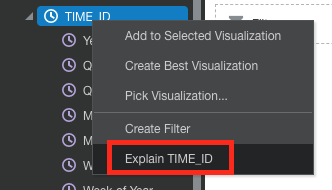
Currently, users only have the ability to access the Explain feature of a column as seen in the attached image. If the user wants to run the Explain feature for example, for the Year (that OAC has derived from the TIME_ID date), this isn't currently possible.
Use Case and Business Need
Running the Explain at a user-defined level of a column may provide some additional insights to the user.
More details
At the moment, this can only be done at the top level of the column.
Original Idea Number: f015f0d616
Comments
-
True, Explain is processed as the server level and uses the base dataset. The auto-generated data parts are not part of the actual dataset. In order to run explain on a date part, go to Prepare, right-click on the date column, and choose Extract. Once you apply the script it will become part of the base dataset and you will be able to run Explain against it.
0
